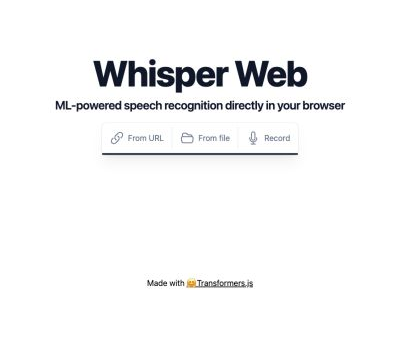
Whisper Web is an open-source browser speech-recognition application by Xenova. It runs Whisper-family models through Transformers.js in a Web Worker, accepts audio from a URL, local file or microphone, and returns timestamped text that can be exported as TXT or JSON. The project is useful as a compact demonstration of client-side automatic speech recognition, not as a maintained, full-featured transcription service.
The maintenance status matters. The main branch was last committed on June 10, 2024 and pins @xenova/transformers 2.7.0. Its README points to a separate experimental WebGPU branch; the main application primarily follows the older Worker/WASM path. Current Transformers.js documentation has moved on to the v3 generation and supports WebGPU more directly, so developers should treat this repository as a readable reference implementation rather than a current framework starter.
Who should use it—and who should not
| User or job | Fit | Reason |
|---|---|---|
| Frontend or ML developer learning browser ASR | Strong | The React, Worker and Transformers.js path is compact enough to inspect end to end |
| Individual transcribing a short, non-sensitive recording | Reasonable | No account or server job is required, but model download and browser memory still matter |
| Team producing reviewed subtitles | Limited | There is no transcript editor, SRT/VTT export, speaker labeling or collaborative review |
| Long-form batch transcription service | Poor | The browser tab owns memory and execution; queues, retries, persistence and observability are absent |
| Medical, legal or regulated audio | Prototype only | Local inference can help privacy, but access control, retention, audit and human verification are not implemented |
Whisper Web is best judged as an educational and prototyping surface. It demonstrates how audio decoding, model loading, chunk callbacks, timestamps and export can work without a transcription backend. That makes it useful for private experiments, conference demos and a first feasibility test on target hardware. It is not a drop-in replacement for a supported transcription product: it has no user accounts, job recovery, model administration, audit log, retention controls, correction interface or service-level guarantees.
For an internal tool, decide who will host the page and model weights, which browsers are supported, and how users will recover from a tab crash or cache eviction. For a public product, add consent around microphone use, model-download expectations, error reporting and a clear statement of where audio and telemetry travel. These operational details matter more than whether the demo can transcribe one clean sample.
What the application actually does
| Area | Implementation | Practical consequence |
|---|---|---|
| Inference | Transformers.js automatic-speech-recognition pipeline in a Web Worker | The UI remains responsive while the browser performs inference |
| Audio preparation | Web Audio API, resampled to 16 kHz and mixed to mono | Browser codec support determines which files decode successfully |
| Long audio | 30-second chunks with 5-second stride; Distil-Whisper uses 20/3 seconds | Overlap helps continuity but can introduce repeated or merged phrases |
| Decoding | Greedy decoding with timestamps and partial callbacks | Simple and inspectable, but it exposes few decoding controls |
| Export | Plain text or JSON timestamp chunks | No native SRT/VTT, speaker diarization or transcript editor |
Audio chosen from a file or microphone is decoded and passed to the model inside the browser. The app still downloads model weights from Hugging Face on first use, and a URL input causes the browser to fetch that remote audio. “Local inference” therefore means the speech-to-text computation is client-side; it does not mean the page makes zero network requests.
Inputs, models and download sizes
| Choice in the current UI | Displayed download | Best fit |
|---|---|---|
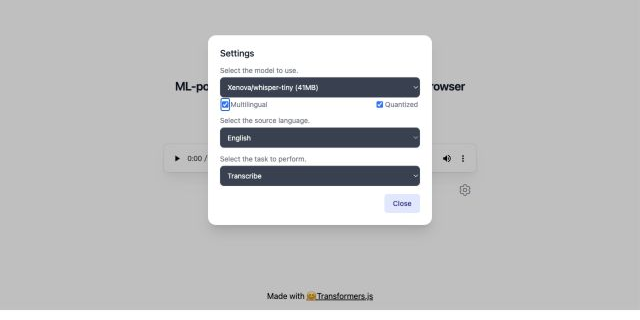
| whisper-tiny, quantized | 41 MB | Fastest first test and lower-memory devices |
| whisper-base, quantized | 77 MB | A modest accuracy step without a large download |
| whisper-small, quantized | 249 MB | More capable local transcription when memory permits |
| whisper-medium, quantized | 776 MB | Higher-capacity experiments on stronger desktop hardware |
| whisper-tiny.en, non-quantized | 152 MB | English audio where fidelity matters more than download size |
| whisper-base.en, non-quantized | 291 MB | English-only work with additional browser memory available |
| Distil-Whisper options | 402 or 767 MB | English-only experiments with the repository's distilled checkpoints |
Multilingual mode reveals a long language selector and lets the user choose either transcription in the source language or translation into English. The UI does not expose automatic language selection, beam search, temperature fallback, vocabulary hints or diarization. Quantization reduces weight size and often improves feasibility, but accuracy and stability must be tested on the intended audio.
Hands-on test: speed versus transcript stability
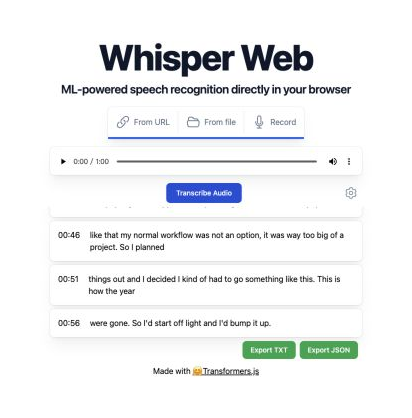
We ran the official bundled 60-second English sample in a Chromium-based desktop browser on August 20, 2026. This is a single environment check, not a standardized model benchmark. Network cache, CPU, browser, thermal state and model download can change the timings.
| Configuration | Observed completion | Observed result |
|---|---|---|
Quantized multilingual Xenova/whisper-tiny (41 MB) | About 27 seconds | Fast, but the latter half produced a conspicuous repeated phrase and several segmentation errors |
Non-quantized English Xenova/whisper-tiny.en (152 MB) | About 36 seconds | Substantially more coherent and better segmented, though it still contained individual recognition errors |
The useful conclusion is not that one timing will reproduce everywhere. It is that the smallest quantized multilingual setting should be treated as a preview configuration. For English material, an English-only checkpoint can be worth the larger download. For multilingual, noisy or domain-specific recordings, compare at least tiny, base and small on representative clips before choosing a default.
How to evaluate Whisper Web properly
| Metric | How to measure | Why it matters |
|---|---|---|
| Word or character error rate | Compare against a human-verified reference transcript | Overall accuracy; use character error rate for languages without word spaces |
| Named entities and numbers | Score names, products, dates, prices and units separately | Small errors can invalidate meeting, legal or research notes |
| Hallucination rate | Include silence, music, applause and low-speech segments | Whisper models can emit plausible text where speech is weak |
| Timestamp drift | Check boundaries at the start, middle and end | Critical for subtitles and seekable transcripts |
| Real-time factor | Processing seconds divided by audio seconds | Separates model speed from subjective waiting time |
| Cold versus warm start | Record model download/load separately from inference | Repeat users may see a very different experience |
| Memory and failure rate | Test target browsers and long files | A model that crashes is not a usable accuracy upgrade |
Recommended test set
clean single speaker ── names + numbers
noisy room ─────────── overlapping voices
phone audio ────────── compression + bandwidth
music/applause ─────── silence hallucination check
long recording ─────── chunk joins + timestamp drift
multilingual clip ──── language/task correctness
- Create human-verified references for 20–30 short clips that match the real use case.
- Run tiny, base and small with the same browser, warm/cold state and quantization setting.
- Record accuracy, first-run time, warm inference time, peak memory symptoms and failures.
- Review proper nouns, numbers, repetitions and silent segments separately from average error rate.
- Test TXT and JSON exports, then decide whether downstream subtitle conversion is acceptable.
Browser, privacy and deployment boundaries
| Boundary | What to check before adoption |
|---|---|
| Browser compatibility | The README requires a Firefox Worker flag; the app's error handler warns about Safari on M1/M2 and recommends Chrome, Firefox or Edge |
| Cross-origin audio | Remote URL loading depends on the source server allowing browser requests; a normal webpage URL is not necessarily a usable audio URL |
| Model caching | Confirm storage quotas, cache eviction and repeated downloads on managed or private browsing devices |
| Sensitive audio | Review page hosting, model delivery, telemetry and browser extensions—not only the inference code |
| Self-hosting | Pin dependencies, serve model assets intentionally, add security headers and test offline behavior |
| Licensing | The application code is MIT-licensed; model checkpoints and submitted audio still have their own terms and rights |
The repository sets env.allowLocalModels = false, so its stock build expects remote model delivery rather than bundled weights. A private or offline deployment needs code and hosting changes. Never claim that simply cloning the UI creates an air-gapped transcription system.
Whisper Web versus similar open-source tools
| Option | Choose it when | Main trade-off |
|---|---|---|
| Whisper Web by Xenova | You want a small React/Transformers.js demonstration with URL, file, mic and timestamp export | Main branch is dated, has limited controls and no native subtitle or diarization workflow |
| whisper.cpp WebAssembly demo | You want a C/C++-based browser path, explicit local model loading and file/microphone support | Its documented WASM example is CPU-oriented, limited to models through small and caps audio at 120 seconds |
| Whisper-WebUI | You need a richer self-hosted subtitle interface, faster-whisper, larger models and backend/API options | Requires Python/server setup and is not purely client-side browser inference |
| Current Transformers.js custom app | You are building a new browser product and want current WebGPU, ONNX and framework integration patterns | You own the full UI, audio pipeline, model lifecycle, QA and compatibility matrix |
| Native whisper.cpp or faster-whisper | Long files, batching, automation or controlled desktop/server performance matter | Installation and deployment are heavier than opening a webpage |
Whisper Web remains valuable because the source is compact and easy to inspect. It is a better learning artifact than a turnkey production choice. For a new application, prototype against the live demo, then compare a current Transformers.js implementation with a native or server-side engine using the same private evaluation set.
Production checklist
representative audio + reference text
              ↓
browser/model/quantization matrix
              ↓
accuracy · hallucination · time · memory
              ↓
local browser ── or ── native/server engine
              ↓
retention · consent · export · human review
- Confirm whether the goal is a demo, private local tool or supported product.
- Pin the repository commit, Transformers.js version and exact model revision.
- Benchmark target languages, accents, noise, silence and file durations.
- Separate cold download time from warm transcription speed.
- Add clear progress, cancellation, memory errors and unsupported-browser handling.
- Decide whether TXT/JSON is enough or add SRT/VTT, editing and diarization.
- Document audio retention, model hosting, consent and deletion.
- Require human review when names, numbers, legal or medical meaning matter.
FAQ
Does Whisper Web upload audio for transcription?
The inference pipeline runs in the browser Worker. However, the page downloads model files, and URL input downloads remote audio into the browser. Review the deployed site's hosting and network behavior before describing it as fully offline.
Does it support live microphone transcription?
It can record from the microphone and transcribe the completed recording. The stock interface is not a continuous low-latency streaming caption system.
Which model should I start with?
Use quantized tiny only for a quick feasibility check. Compare tiny, base and small on representative audio. English-only checkpoints can be more stable for English speech, while multilingual checkpoints are required for other languages and English translation.
Can it export subtitles?
Not directly. The current UI exports TXT and timestamped JSON. SRT or VTT requires a conversion step and timestamp review.
Is the WebGPU version the default?
No. The repository README links WebGPU as an experimental branch. Current Transformers.js documentation supports WebGPU, but this main branch remains on the older 2.7 dependency.
Is it actively maintained?
The main branch's latest commit was June 10, 2024 when reviewed on August 20, 2026. The demo still runs, but the maintenance gap should be included in technical adoption decisions.
Sources reviewed
- Whisper Web GitHub repository
- Whisper Web README and WebGPU branch note
- Audio inputs, models, sizes, languages and tasks
- Worker inference, chunking and decoding implementation
- Timestamp display and TXT/JSON exports
- Official live Hugging Face Space
- Current Transformers.js WebGPU guide
- whisper.cpp WebAssembly example
- Whisper-WebUI repository
Independent review and hands-on test: August 20, 2026. Repository state, browser support, model files and demo availability can change; verify the current source and target devices before deployment.