Self-Operating Computer 深度评测:有影响力的桌面控制实验,也带来巨大的信任边界
Self-Operating Computer 是 OthersideAI 的开源 Python 框架:模型看到屏幕截图,再决定鼠标与键盘动作。它在 2023 年 11 月发布,是较早公开演示 general computer use 的项目之一。今天更适合作为研究和开发实验,而不是成熟个人助理,因为安装后本地代码与远程视觉模型会获得极强的桌面观察和输入能力。
最新正式 release 是 v1.5.8(2025-02-28);仓库未 archived,最后可验证 commit 是 2025-09-19 的 README typo 修复。这个信号既不等于项目死亡,也不代表高频开发。到 2026 年必须在 disposable machine 上重新核对 OS permission、依赖与 model endpoint,不能把旧 README 的 model name 和计费提示当作实时事实。
README 称支持 macOS、Windows 和带 X server 的 Linux。macOS 会要求 Terminal 获得 Screen Recording 与 Accessibility。两项权限就是产品的核心风险:前者能看到敏感像素,后者能生成系统输入。Demo 成功只证明视觉定位,不证明 authorization、隔离、审计或生产可靠性。
当前项目状态
| 信号 | 核实状态 | 决策 |
|---|---|---|
| Latest release | v1.5.8 · 2025-02-28 | Pin version and dependencies; test on current OS |
| Latest commit | fac568e · 2025-09-19 · README typo | Low recent feature signal; inspect open issues |
| Archived | No | Not the same as a support SLA |
| License | MIT | Model APIs, websites and data have separate terms |
| Observation | Screenshots; OCR and Set-of-Mark modes | Pixels may contain credentials and private data |
| Action | Mouse and keyboard through local OS automation | Can click, type, submit, delete or send |
| Models named in README | GPT-4o/4.1, o1, Gemini, Claude 3, Qwen-VL, LLaVA | Some names/instructions are historical; verify live APIs |
| Platforms | macOS, Windows, Linux + X server | Permissions and coordinates differ |
循环如何工作,又会在哪里失效
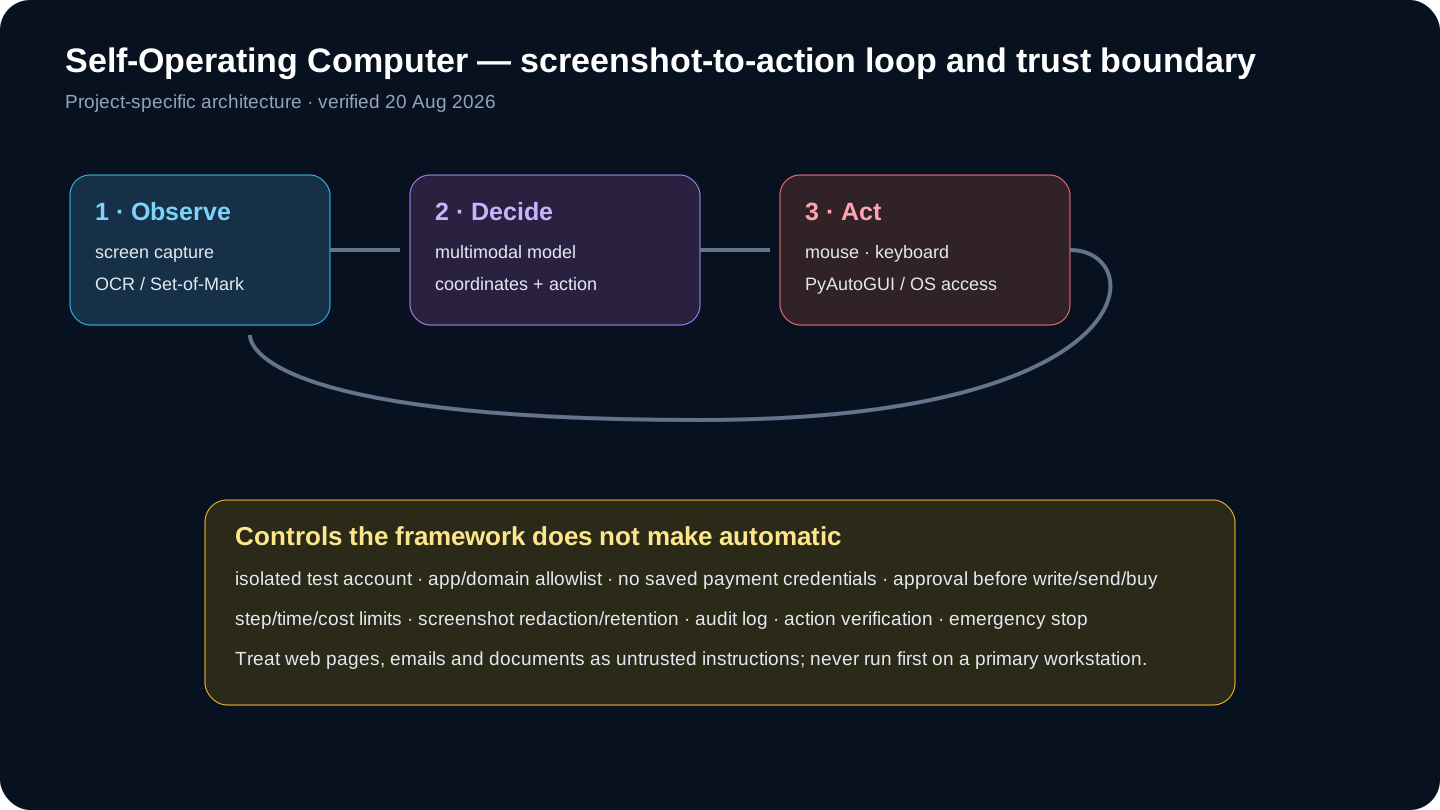
Loop 很直接:截取当前屏幕,选择 OCR 或 Set-of-Mark 增加坐标提示,让多模态模型给出 click、type、keypress,再执行并重新截图。它无需每个应用提供 API,因此覆盖面广;但 resolution、scaling、popup、animation、窗口焦点、dark mode 和图标歧义都会让观察与动作之间的坐标失效。
OCR 能把可见 label 映射到坐标,SoM 能给区域编号,却都不理解按钮的业务含义。准确点击 Send、Delete 或 Buy 仍可能是错误决策。每个有后果的动作必须由应用 state 或 human approval 做 semantic validation,而不是相信 pixel confidence。
Model 会改变 grounding、latency、price、privacy 和 tool semantics。README 混有现行与历史 model name,并明确警告 local LLaVA error rate 很高。应在固定 display size、language、theme 与 app 上建立私有 evaluation set;供应商 benchmark 不能证明你的桌面任务可用。
安全评测流程
- 创建无个人凭据、文件、同步和支付方式的 disposable VM/测试账户。
- 固定 v1.5.8、Python、依赖、OS、display scaling 与 model ID。
- 只授予必要 Screen Recording/Accessibility,测试后撤销。
- 设计 30–50 个短任务,定义截图、动作、终态与 forbidden action。
- 先做只读导航,记录 action proposal、coordinate、latency、token 与 result。
- 增加 app/domain/action allowlist、step/time/cost ceiling、kill switch 与 confirmation。
- 测试 popup、窗口移动、dark mode、多屏、slow page、injection、wrong account。
- 测量 success、false action、recovery、approval、latency、cost 和 data exposure。
- 只在 sandbox 测试 reversible write,使用 idempotency 并逐步验证 state。
- 同任务能用 API、Playwright 或 RPA 时优先 structured automation。
安全、隐私与生产限制
| Risk | Control | Residual issue |
|---|---|---|
| Wrong coordinate | Fixed resolution, re-observe, post-action check | UI can move after screenshot |
| Prompt injection | Treat pixels as data; allowlist apps/actions | Model may follow hostile text |
| Credential exposure | Test account, no password manager, screenshot redaction | Pixels can reveal secrets |
| Irreversible action | Human approval and reversible sandbox | Clicks can submit immediately |
| Runaway loop | Step/time/token/cost caps + kill switch | Retries amplify mistakes |
| Cross-app drift | Single-app focus and process/window verification | OS focus may change |
| Supply chain | Pin package/hash and inspect dependencies | Local automation code has desktop privilege |
| Weak audit | Store action proposal/result without hidden reasoning | Screenshots still need retention controls |
首次运行应放在 disposable VM 或独立 OS account,移除个人文件、browser sync、password manager、cloud drive、developer key 与 payment method。只允许测试 domain,创建 test-only SaaS account。OS permission 不是细粒度 authorization,一旦 Terminal 有 Accessibility,prompt 限制只是薄弱边界。
Hosted provider 收到的 screenshot 可能包含 email、token、医疗或财务信息、notification 与无关窗口。要明确 provider、region、retention、training policy;尽可能 crop/redact、关闭其他 app 与 notification,并为 screenshot/log 设置删除周期。Local model 只改变网络边界,不消除恶意内容和错误输入。
网页、邮件和文档可写入 prompt injection,诱导 agent 忽略任务、泄露数据或点击危险控件。Observed content 必须当作不可信数据;禁止 terminal/password manager,allowlist app/domain/action;登录、发送、购买、删除、上传、permission change 和 legal acceptance 都需要确认。每个 write 后验证 state。
替代方案与独立判断
| Alternative | Best fit | Trade-off |
|---|---|---|
| Self-Operating Computer | Learning and testing general desktop vision loops | Open source/flexible; minimal production controls |
| Claude Computer Use | Current Anthropic model/tool contract and reference implementation | Provider dependency; still requires sandbox and approvals |
| OpenAI computer use / ChatGPT agent | Managed current computer/browser capability | Hosted boundary and product limits |
| Browser Use | Open-source browser-focused agent workflows | Less suited to arbitrary native desktop apps |
| Playwright | Known web flows with DOM selectors and repeatable tests | Not general visual desktop control |
| UiPath / enterprise RPA | Governed business automation, credentials and audit | Higher setup/licensing; selectors still require maintenance |
| Native APIs / scripts | Stable systems with supported interfaces | Most reliable, but not available for every app |
独立判断:它是理解 coordinate-based computer-use loop 的优秀早期项目,但不应成为已知业务流程的默认自动化方案。Playwright、native API 或 RPA selector 更快、可测试、也更容易授权。只有没有 structured interface 时才选择视觉控制,并让 blast radius 小于任务价值。
相较现代方案,它提供源码级自由与 model experiment,却缺乏 managed safety 和 operations。Claude Computer Use/OpenAI computer use 给出当前 tool contract;Browser Use 聚焦 browser;UiPath 与 Playwright 偏 structured automation。没有任何方案自动免疫 injection,关键差异在 isolation、observability 与 reproducibility。
常见问题
主力电脑安全吗?
不要首次在主力机运行;使用隔离 VM/账户并移除凭据。
当前版本?
核实为 v1.5.8(2025-02-28)。
能离线吗?
LLaVA/Ollama 可本地推理,但 README 警告错误率高。
为何要两项系统权限?
一项看屏幕,一项生成输入,因此 trust boundary 很大。
OCR 能生产使用吗?
只能改善定位,不能判断授权与业务正确性。
与 Playwright 区别?
前者用像素跨应用;后者用 DOM,已知 web flow 通常更稳定。
适合什么任务?
sandbox 中低风险、可逆、短任务。
仍在维护吗?
未 archived,但 release 停在 2025-02,需自行核对 issue 与兼容性。
来源
- Official repository
- Official README and installation
- Official releases
- Official commit history
- MIT license
- PyPI package
- OpenAI computer-using agent
- Anthropic computer-use documentation
- Browser Use documentation
- OSWorld benchmark
独立核查:2026 年 8 月 20 日。模型、API、价格与 OS 权限会变化,安装前请核对实时官方文档。