Independent verdict: SiteOne Crawler is an MIT-licensed cross-platform crawler and analyzer spanning SEO, security, accessibility, performance and quality assurance. Its strongest fit is teams that want one repeatable website inventory feeding several engineering and marketing quality checks. The main adoption mistake would be to treat an open repository or a high star count as proof that its recommendations, data or scores are correct for every site.
The cross-functional report is useful only if findings are routed by owner; otherwise breadth turns into one large backlog with no decision rule.

What SiteOne Crawler actually does
SiteOne Crawler should be evaluated as a crawler tool, not as a universal SEO platform. The verified repository description is: “SiteOne Crawler is a cross-platform website crawler and analyzer for SEO, security, accessibility, and performance optimization—ideal for developers, DevOps, QA engineers, and consultants. Supports Windows, macOS, and Linux (x64 and arm64).” The distinction matters because a crawler, a structured-data library and an MCP connector solve different layers of the SEO workflow.
| Verified capability | Practical meaning |
|---|---|
| Runs on Windows, macOS and Linux, including x64 and arm64 builds documented by the project. | Check the official setup and version before relying on it. |
| Combines website crawling with multiple quality disciplines, making it useful to developers, DevOps, QA and consultants. | Treat integrations as separate trust and cost boundaries. |
| Broad coverage increases triage work: a single crawl can mix ranking, security, accessibility and performance findings with different owners and severity models. | Benchmark the behavior on a representative site or account. |
Current GitHub evidence snapshot
The table below was captured on 19 October 2026. “Latest” means recent repository activity in this review, while “hot” is a blend of attention and activity. Neither term is a quality guarantee.
| Evidence | Observed | How to interpret it |
|---|---|---|
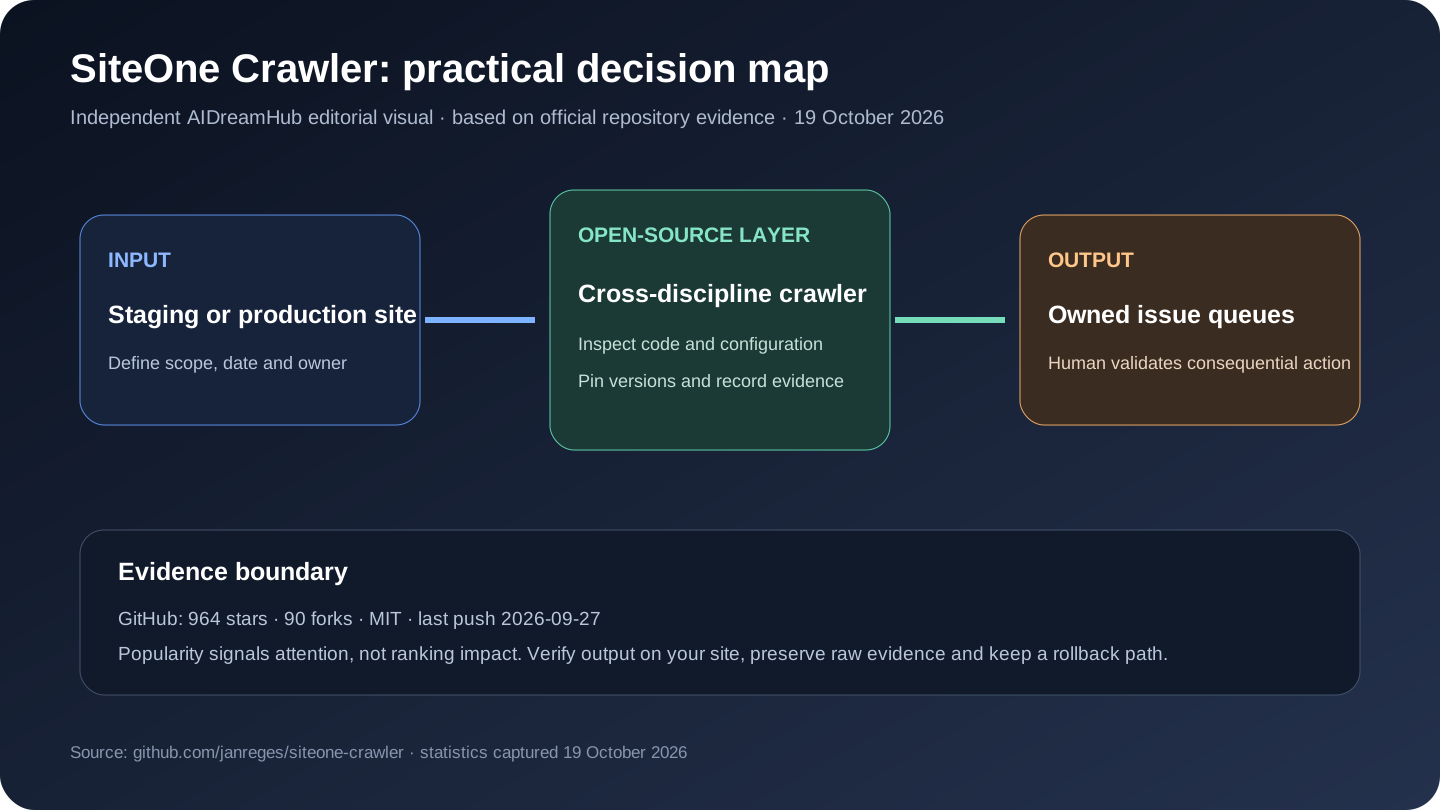
| Repository activity | 964 stars · 90 forks | Community attention and reuse signal; not proof of SEO outcomes |
| Last push | 2026-09-27 | Recent code activity; inspect releases and breaking changes before production |
| License | MIT | Confirm obligations for distribution, SaaS use and modifications |
| Primary stack | Rust | Indicates the likely maintenance skills, not feature completeness |
Best-fit workflows
Best fit: teams that want one repeatable website inventory feeding several engineering and marketing quality checks.
- Audit a staging site before a redesign launches.
- Create a cross-functional issue report for SEO, security and accessibility owners.
- Run repeatable command-line checks in a delivery pipeline.
Practical starting point: Define crawl boundaries and credentials, run a staging sample, route each issue class to the right owner, verify critical findings manually, then set narrow regression gates.
Limitations, security and operating cost
- A broad scanner may be less specialized than dedicated tools in each discipline.
- Authenticated and highly interactive applications require careful crawl configuration.
- Severity should reflect user and business impact, not only the scanner label.
Open source removes one form of lock-in, but it does not remove engineering time, model or API charges, browser/proxy costs, data-provider terms, authentication work, backups or upgrade risk. Map every external service and every write-capable action before production use.
SiteOne Crawler compared with alternatives
| Option | Choose it when | Trade-off |
|---|---|---|
| LibreCrawl | local SEO-focused crawling and customization | narrower scope and younger product |
| SEOmator | large deterministic rule set with desktop and agent options | more SEO scoring, different reporting |
| Separate specialist scanners | regulated or deep security/accessibility work | more accurate depth, more tool coordination |
The comparison is task-based, not a claim that one product is universally better. A narrow library may outperform a suite inside its framework, while a mature commercial crawler may be cheaper than maintaining an open tool at large scale.
A seven-step evaluation before adoption
- 1. Define one decision and a bounded test set before installing or connecting accounts.
- 2. Pin the repository revision or release and record the configuration used.
- 3. Verify several outputs against the live page, source console or another independent tool.
- 4. Separate deterministic observations from scores, estimates and model-written recommendations.
- 5. Measure false positives, missing coverage, runtime and provider cost on a realistic sample.
- 6. Use least-privilege credentials; require approval for edits, submissions, purges or publishing.
- 7. Keep raw exports and a rollback plan so the result can be audited after an update.
Our independent take
The cross-functional report is useful only if findings are routed by owner; otherwise breadth turns into one large backlog with no decision rule. That is also the decision boundary: keep the tool if it produces reproducible evidence and reduces work on a real site; reject it if the team mainly receives more scores, prose or issue volume without clearer decisions.
Frequently asked questions
Is it really open source?
The GitHub API reported MIT on 19 October 2026. Review the repository's license file and dependency licenses for the exact rights and obligations. A connected cloud API or hosted service can have separate terms even when the client code is open.
Does GitHub popularity mean it improves rankings?
No. Stars and forks indicate attention and reuse, not ranking lift, data accuracy or suitability for a particular site. Use a controlled evaluation with Search Console, analytics and manually verified output.
Who is it best for?
SiteOne Crawler is best suited to teams that want one repeatable website inventory feeding several engineering and marketing quality checks. It is a poor fit when the team cannot operate its runtime, verify its evidence or own the permissions it requests.
What should be tested first?
Use one representative workflow: Audit a staging site before a redesign launches. Record inputs, raw output, time, failures and any external cost, then compare with the team's current method.
Can it replace a commercial SEO suite?
Usually only for a defined slice of work. Open-source workflow and audit tools rarely include the same proprietary backlink index, historical SERP coverage, support organization, permissions and polished client reporting as a mature paid suite.
How to Use SiteOne Crawler: Quick Start
This workflow is condensed from the project's official README and documentation. Run it first on a test site, test property or local environment; check the linked source again when versions change.
Prerequisites
- A supported Windows, macOS or Linux system
- A prebuilt binary or Homebrew on macOS/Linux
- Permission and limits for the target site
Install and run
brew install janreges/tap/siteone-crawler

# First crawl
siteone-crawler --url=https://example.com

# JavaScript rendering when required
siteone-crawler --url=https://example.com --browser --screenshots
First-use workflow
- Install a prebuilt binary or the Homebrew package; choose the compatible Linux variant when glibc is older.
- Run the first crawl without browser rendering on a small site.
- Review the generated report across SEO, security, accessibility and performance categories.
- Enable --browser only when client rendering materially changes the page.
- Assign each verified issue class to the correct engineering, content or security owner.
How to confirm it worked
The crawl completes with an auditable URL inventory, and manually checked high-severity findings match the live response and rendered page.
Before production use
Browser rendering and screenshots increase runtime. Do not merge every scanner category into one unowned backlog; use discipline-specific severity and regression gates.
Official Quick Start source: janreges/siteone-crawler README.
Sources reviewed
- Official GitHub repository
- Official README
- Official releases
- Commit history
- Official project website or documentation
- Repository license
Editorial review updated 19 October 2026. Repository statistics, documentation, dependencies and hosted-service terms can change. Verify the linked official sources before installation, procurement or deployment.