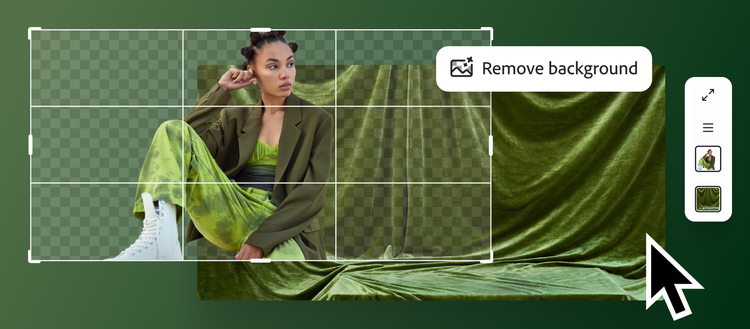
Photoshop AI is the set of generative and machine-learning features inside Adobe Photoshop rather than a separate product. The current desktop application combines Generative Fill, Generative Expand, Generate Background, Generate Image, Generate Similar, Harmonize, Generative Upscale and AI-assisted removal with Photoshop’s selections, masks, layers, color tools and export pipeline.
The important distinction is editability. A prompt result can land on a separate Generative Layer with a mask, so a retoucher can inspect, revise, blend or remove it without flattening the original. Photoshop does not make generated pixels inherently correct or rights-cleared. It gives professionals better tools to control and document the result.

The current Photoshop AI toolset
| Feature | What it does | Best use | Failure to inspect |
|---|---|---|---|
| Generative Fill | Adds, replaces or removes content inside a selection | Object changes, repairs and controlled composites | Edges, scale, reflections, shadows and repeated texture |
| Generative Expand | Fills canvas added by the Crop tool | New aspect ratios and breathing room | Invented architecture, horizon drift and empty-looking repetition |
| Generate Background | Creates a scene behind a subject | Product/lifestyle variations | Ground contact, perspective and brand-inappropriate context |
| Generate Similar | Creates variants from a selected result | Controlled exploration after direction is found | Small identity/product changes across variants |
| Reference Image | Guides object or whole-image appearance | Composition, material and design consistency | Copying protected style, logo, person or product details |
| Harmonize | Adjusts lighting, color, shadows and details of a composite | Blending an inserted subject | False cast shadows and loss of intentional color grading |
| Generative Upscale | Raises resolution and synthesizes detail | Moderate enlargement and damaged assets | Invented text, facial features and product texture |
| Remove Tool | Erases selected distractions using surrounding content/AI | Cleanup and retouching | Removed evidence, duplicated structures and disclosure needs |
A nondestructive production workflow
 rights-cleared source + delivery brief
                 |
       duplicate / Smart Object
                 |
 precise selection + mask + prompt/reference
                 |
      choose model + generate variants
                 |
       Generative Layer (never flatten yet)
                 |
 .---------------+----------------.
 v               v                v
pixel QA      rights QA       provenance QA
edges/light    people/IP       model/credentials
 '---------------+----------------'
                 v
 manual retouch + color + typography
                 |
 PSD master + approved derivative exports
Start with the destination: dimensions, color space, print or screen, required crop, allowed transformations and rights. Preserve the source as a Smart Object or locked layer. Make the smallest selection that provides enough context; include a controlled overlap around edges. Generate a few variants, select on structure rather than surface polish, then finish with masks, Curves, Dodge/Burn, Clone/Healing and manual typography.
Model selection in 2026
Photoshop’s model picker currently groups Adobe models and partner models. For Generative Fill, Adobe documents Firefly Image 5, Firefly Fill & Expand and Firefly Image 1. Partner choices include Gemini 3.1 with Nano Banana 2, Gemini 3 with Nano Banana Pro, Gemini 2.5/Nano Banana, FLUX.2 pro and FLUX.1 Kontext [pro]. Availability varies by region, account, release and feature.
| Model family | Use when | Governance question |
|---|---|---|
| Firefly Fill & Expand | Context-aware editing and canvas extension are primary | Does the result meet the project’s Firefly/enterprise terms? |
| Firefly Image 5 | Newer Adobe generation quality or broad creative exploration | Does it preserve the selected subject/product accurately? |
| Gemini/Nano Banana models | Instruction following, reference-guided edits or composition suits the model | Premium credit cost and partner-model terms/availability |
| FLUX Kontext / FLUX.2 | Reference-based contextual editing or a different visual prior is useful | Reference limit, output consistency and partner provenance |
“Partner model inside Adobe” is not “Adobe model.” Adobe says partner developers contractually agree that prompts and inputs are used only to generate the content and are not used to train Adobe or partner models. Users must still decide whether a partner model is appropriate and accept the partner-model confirmation. Enterprise policy may allow Firefly and prohibit partner models, or require separate review.
Generative credits: standard versus premium
Adobe has one generative-credit balance used across eligible Creative Cloud and Firefly features, but features are classified as standard or premium. Most standard Photoshop generations using Firefly, such as Generative Fill, consume one credit per generation. Some plans—including Creative Cloud Pro, eligible enterprise editions, Firefly plans and credit plans—currently include unlimited standard generations; premium features continue to consume credits.
| Photoshop action | Current classification/usage | Planning note |
|---|---|---|
| Firefly Generative Fill/Expand | Usually standard; typically 1 credit/generation | “Unlimited standard” depends on eligible plan |
| Remove Tool | Standard; currently documented as no credit | Behavior and policy can change |
| Harmonize | Standard but documented at 5 credits/generation | Batching variants can consume balance quickly |
| Firefly Generative Upscale | More than one credit, based on output size | Test target dimensions before bulk processing |
| Partner-model fill/generation | Premium; model/output-size dependent | Photoshop Generative Fill may consume 10–40 credits for some Gemini outputs |
Adobe’s partner-model table listed time-limited rates in June 2026—for example 5–60 credits across GPT Image variants, 10–40 for Gemini configurations and 5–20 for several FLUX configurations. These are not durable prices. The in-app Generative Credits Usage panel is authoritative for the active plan and action. Measure accepted-result cost, not one click: three generated variants, reference retries, Harmonize and Upscale can compound.
Prompting and selection design
| Control | Good practice | Why |
|---|---|---|
| Selection | Include a small context overlap; feather only when edge type warrants it | Model needs boundary cues without rewriting unrelated pixels |
| Prompt | Describe object, material, view, lighting and spatial relationship | Concrete constraints beat long aesthetic adjective lists |
| Blank prompt | Use for context-aware removal/fill when surroundings imply the answer | A new object prompt can introduce unnecessary semantics |
| Reference | Use owned/authorized image and state object versus whole-image intent | Prevents ambiguous composition transfer |
| Iteration | Lock good regions; regenerate only the weak area | Whole-image retries create drift and waste credits |
| Seed/reproducibility | Save PSD, generated variations, prompt and model/version metadata | Exact model output may not be reproducible later |
Reference Image is a rights boundary
Firefly Fill & Expand supports a reference image with object/whole-image and swap/place intentions. Partner models can accept multiple references—Adobe currently documents up to three for Flux and up to eight for Gemini in the applicable workflow. More references increase control and increase the number of assets whose rights and personal data must be checked.
| Reference type | Safe evidence | Risk |
|---|---|---|
| Owned product photo | Internal asset ID and photographer/model releases | AI changes legally required product details |
| Client brand asset | Contract permits generative processing and partner models | Confidential campaign leaks before release |
| Person’s face/body | Explicit consent for this manipulation and channel | Identity misuse, endorsement or sensitive inference |
| Third-party artwork | License permits derivative/generative use | Copyright/style/trademark dispute |
| Public web image | Verified public-domain or compatible license | Visibility online is not permission |
Commercial use and “commercially safe”
Adobe positions Firefly as designed to be commercially safe, citing training on licensed Adobe Stock and public-domain/openly licensed content for relevant models. This reduces some training-data concerns; it does not guarantee a particular output is non-infringing or suitable. Outputs can resemble protected brands, characters, trade dress, people or existing works, especially when prompted or reference-guided.
Partner models have their own developers and characteristics. Adobe’s general/product-specific terms, partner notices and the customer’s plan govern use. For high-value campaigns, run reverse-image/similarity checks, trademark review, talent consent, product-accuracy review and counsel review. Never describe an output as “copyright guaranteed.” Copyrightability of AI-heavy work also varies by jurisdiction and human authorship.
Content Credentials and provenance
Adobe integrates Content Credentials, C2PA-based metadata that can carry information about origin and generative use. Adobe says images wholly generated with generative AI receive credentials, and UI/credentials can identify the source model. Treat this as useful provenance, not an indelible watermark: platforms can strip metadata, screenshots can break the chain and an edited asset may require export settings that preserve credentials.
 source hash + rights record
        |
 PSD with named Generative Layers
 prompt / reference IDs / model / date / reviewer
        |
 Content Credentials (when attached/preserved)
        |
 export hash + campaign/version ID
        |
 publication log + expiry/revocation
Keep an internal manifest alongside the PSD even when Content Credentials are present. It should explain which pixels are synthetic, the purpose of the edit, source licenses and approval. This matters for journalism, documentary evidence, regulated products and before/after claims.
Pixel-level quality assurance
| Area | Inspect at 100–200% | Typical artifact |
|---|---|---|
| Edges/masks | Hair, glass, foliage, jewelry and motion blur | Halos, melted detail or hard selection seams |
| Geometry | Perspective, symmetry, hands, wheels, architecture | Impossible joints, converging lines or repeated objects |
| Lighting | Direction, softness, color temperature and contact shadows | Inserted object floats or casts conflicting shadow |
| Reflections | Mirrors, metal, glass, water and glossy packaging | Scene/object not reflected consistently |
| Texture/noise | Grain, compression and depth-of-field transitions | Generated region is unnaturally smooth/sharp |
| Identity/product | Face, logo, labels, ports, buttons and proportions | Brand or model changes silently |
| Text/data | Typography, numbers, units and legibility | Pseudo-text or altered factual label |
Task-specific acceptance tests
| Use case | Acceptance test | Do not publish when |
|---|---|---|
| Ecommerce product | Compare product silhouette, color and every functional detail to approved SKU | Generated image implies an accessory/feature not included |
| Portrait retouch | Subject approves meaningful alterations; identity stays intact | Body/skin/age change creates deceptive representation |
| Real-estate expand/remove | Disclosure and market rules reviewed; structural features unchanged | Image invents a view, space or fixture |
| News/documentary | Follow editorial policy; preserve original and edit log | Generated content could be mistaken for evidence |
| Advertising composite | Legal/brand approves claim, talent, product and background rights | Output resembles third-party IP or implies endorsement |
| Upscaled archival image | Label synthesized detail and compare against original | New detail is presented as recovered historical fact |
Security and confidential material
Cloud generative features transmit prompts and image context for processing. Adobe states content is not used to train Adobe or partner generative models under the described service arrangements, but organizations still must evaluate retention, subprocessors, region, admin controls and contract tier. Do not use an unapproved partner model with embargoed product imagery, identity documents, unreleased campaigns or regulated customer data.
- Use enterprise storage, access controls and named project ownership for PSD masters.
- Remove hidden layers, metadata and source assets from delivery files unless required.
- Restrict plugin/actions/scripts that can upload documents outside approved Adobe services.
- Separate personal Adobe accounts from client/enterprise workspaces.
- Test account offboarding, version recovery and deletion of cloud documents and shared reviews.
Benchmark the workflow, not one hero image
- Select 30 real edits: removal, expansion, product background, person composite, reference-guided replacement and upscale.
- Run Firefly and eligible partner models with the same selection and acceptance criteria.
- Record generations, credits, time, rejected variants and manual retouch minutes.
- Have a blinded reviewer score structural correctness, editability, rights risk and delivery readiness.
- Compare against Content-Aware Fill/manual retouch and an external generator-plus-Photoshop workflow.
| Metric | Definition | Why it matters |
|---|---|---|
| First-pass acceptance | Tasks with usable structural result / tasks | Predicts iteration cost |
| Median manual repair | Minutes from chosen generation to approved export | AI generation time alone is misleading |
| Credits/accepted asset | Total credits including rejects / approved outputs | Supports plan selection |
| Identity/product defect rate | Outputs with material unauthorized change | Critical for people and ecommerce |
| Provenance completion | Assets with source, model, layer and approval record | Enables audit and revision |
Alternatives
| Alternative | Choose when | Trade-off |
|---|---|---|
| Photoshop manual/Content-Aware tools | Evidence preservation, exact pixels or small cleanup dominates | More labor; deterministic editorial control |
| Adobe Firefly web | Ideation, boards, video/audio or batch generation before editing | Broader generation surface; less direct pixel/layer control |
| Affinity Photo | Traditional editing without Creative Cloud subscription | Lower cost; less integrated generative ecosystem |
| Stable Diffusion/ComfyUI | Local control, custom models and reproducible node workflows matter | More setup, licensing/model governance and compositing work |
| Canva/Magic Studio | Template-based social production and team brand workflow dominate | Faster layout; less deep retouching |
| Dedicated partner model apps | You need that model’s newest controls or API | Potentially earlier features; broken layer/provenance workflow |
FAQ
Is Generative Fill destructive?
It can create a separate Generative Layer and mask, enabling nondestructive editing. Preserve the layered PSD and do not flatten until an approved derivative requires it.
Does every generation cost one credit?
No. Most Firefly standard features use one, Remove currently uses none, Harmonize uses five, Upscale varies by size, and partner models can consume many premium credits.
Are partner models trained by Adobe?
No. They are third-party models integrated into Adobe products. Adobe distinguishes them in the UI and terms; users must confirm suitability.
Can I use generated content commercially?
Adobe licenses use under applicable terms, but users remain responsible for third-party rights, trademarks, likeness, deceptive claims and jurisdiction-specific copyright.
Do Content Credentials prove an image is true?
No. They provide provenance assertions about creation/editing when present and intact. They do not validate the depicted event or survive every export/platform.
Should I use AI Upscale for documents or evidence?
Only with clear labeling and the original preserved. Upscaling can invent plausible detail and must not be presented as recovered fact.
Sources and verification
- Adobe Photoshop generative AI feature overview
- Official Generative Fill workflow and model list
- Official Photoshop model selection guide
- Official Reference Image guidance
- Adobe standard and premium generative feature table
- Adobe partner models, credits and data-use explanations
- Official generative credits FAQ
- Content Credentials overview
- Adobe legal terms and product-specific links
Last reviewed July 26, 2026. Photoshop models, credit rates, regional availability and terms change frequently. Verify the in-app usage panel and current legal terms before production.