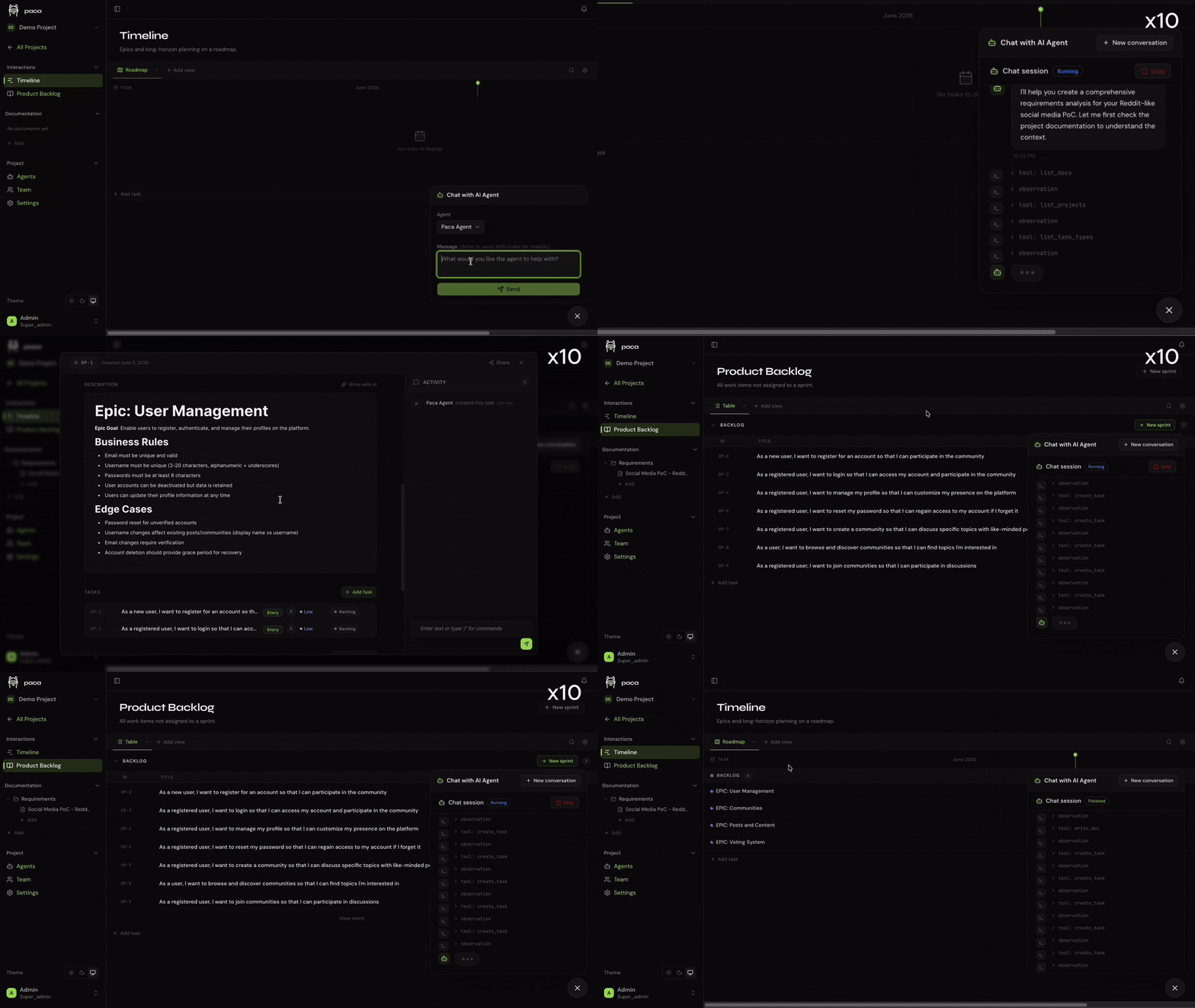
Paca is an open-source, self-hosted project-management platform designed for Scrum teams in which AI agents appear as first-class teammates. Humans and agents share the same backlog, sprints, Scrumban board, BDD specifications, system-design documents and activity stream. Agents can pick up tasks, update fields, create documentation and participate in status-driven automation rather than operating in a detached chatbot.
That design makes work visible, but it also gives an agent authority over the team’s operational record. A board status can trigger handoffs, reporting or release decisions. Therefore “agent updated the card” is not evidence that the work is done. Paca is most valuable when teams define verifiable completion, constrain mutations, preserve diffs and keep humans accountable for high-impact transitions.
The P-A-C-A operating cycle
| Phase | Team activity | Required evidence |
|---|---|---|
| Plan | Humans and agents refine backlog, BDD scenarios and system design | Owner, acceptance criteria, dependencies, risk and test plan |
| Act | People/agents pull tasks, execute and post updates | Traceable branch/artifact/tool result, not narrative status alone |
| Check | QA agents run verification and humans review output | Independent tests, security review and acceptance sign-off |
| Adapt | Sprint data informs retrospective and next plan | Outcome metrics, escaped defects and documented process change |
The cycle resembles Scrum and the scientific method: hypothesize, act, measure and revise. It only works when failed attempts remain visible. If agents mark work done based on their own output, velocity rises while reality does not. Make “Check” independent from the implementing agent for material tasks.
Human-agent task lifecycle
 product owner: outcome + constraints + acceptance tests
                          |
                   READY FOR AGENT
                          |
      agent claims task -> isolated workspace -> artifacts
                          |
             evidence attached to Paca task
          commit / PR / tests / screenshot / cost / trace
                          |
             QA agent checks deterministic gates
                          |
                  HUMAN REVIEW
              / approve      \ reject
          DONE + audit      rework + reason
                          |
             retrospective / memory update
Separate “agent finished a run,” “checks passed,” “human accepted,” and “customer outcome observed.” They are different states. Use explicit transition permissions rather than letting every agent move a card from backlog to done.
Core product surfaces
| Surface | What Paca provides | Governance question |
|---|---|---|
| Unified Scrumban board | Real-time human/agent assignments and status | Who can mutate scope, owner, priority and done state? |
| In-app AI chat | Create/update projects, epics, stories, tasks and docs in natural language | Does every mutation show a preview/diff and actor identity? |
| Activity diff/revert | Before/after field changes with one-click revert | Does revert cover side effects outside Paca? |
| BDD editor | Collaborative Gherkin scenarios | Are scenarios executable and tied to CI, or decorative prose? |
| System Design Documents | Living architecture context for agents and people | How are stale decisions superseded and reviewed? |
| Automation canvas | Status/dependency graph and automatic assignment | Can a cycle, duplicate event or bad status cascade? |
| MCP/ACP/skills | External coding agents read/write Paca and execute tasks | Which tools, projects, credentials and local files are exposed? |
| WASM/plugins | Backend capability sandbox and frontend extensions | Who signs/reviews plugins and grants capabilities? |
ACP versus MCP integration
Paca v0.10.0 documents Agent Client Protocol (ACP) support through a local paca-acp-bridge. It can connect Claude Code, Codex, Gemini CLI or another compatible agent running from the project source directory. Conversation streams back to Paca over an authenticated WebSocket, while the agent uses the developer’s local authentication, git/GitHub credentials, MCP servers and installed skills.
The built-in/packaged MCP server exposes Paca’s project-management data and mutation tools to MCP clients. These protocols solve different layers: ACP manages an agent session and execution; MCP exposes tools/data. Combining them creates a broad authority path from a board instruction to local code, GitHub and third-party services.
| Integration | Primary role | Risk boundary |
|---|---|---|
| Paca MCP server | Read/write projects, tasks, sprints, docs and workflows | API key scope, prompt injection and unintended board mutation |
| Claude Code skills | Natural-language sprint/epic/task workflows from editor | Skill instructions plus host tool permissions |
| ACP bridge | Run local coding CLI and stream session | Local repository, shell, git/gh credentials and installed MCP tools |
| OpenHands agent containers | Run agents in isolated sandbox containers | Image provenance, mounts, network, secrets and escape defense |
“No code cloned into a cloud sandbox” for the local ACP path reduces one exposure but increases dependence on the local workstation’s permissions. Use a dedicated worktree/container, least-privilege GitHub token, network allowlist and explicit approval for push, merge, deployment and external messaging.
Permissions by task transition
| Action | Default agent authority | Human approval |
|---|---|---|
| Read backlog/docs | Allowed within assigned project | Not normally needed; sensitive projects segmented |
| Create draft task/spec | Allowed, labeled AI-drafted | Before commitment to sprint or external promise |
| Change own task to in progress | Allowed with run/workspace identity | No, if concurrency and WIP rules pass |
| Mark implementation complete | Allowed only to “awaiting checks” | Required for accepted/done on material work |
| Change priority/scope/estimate | Suggest with diff | Product owner |
| Activate/edit automation | Draft/test only | Workflow owner, especially while live |
| Push/merge/deploy/delete | Denied or tightly scoped | Required according to environment/risk |
Automation workflows: model them as code
Paca’s canvas can connect tasks in a dependency graph. Status rules automatically assign or reassign the next node, and AND-joins can wait for multiple predecessors. Agents can create/edit workflows through MCP tools, and current documentation says graphs can be changed while active. This is powerful and operationally risky.
 approved spec
      |
   implementation
    /        \
 unit tests  security scan
    \        /
     AND gate
        |
 human review
    / pass  \ fail
 deploy     rework
- Version every graph and record who activated it.
- Simulate with fixtures before allowing live mutation.
- Give each node idempotency keys and maximum retry/loop counts.
- Pause when an assignee/agent is offline, quota-limited or unauthorized.
- Do not treat task status as proof; fetch CI/deployment state from the authoritative system.
- Require approval when edits affect a running high-impact workflow.
BDD and system-design documents
Paca uses Gherkin-style Given/When/Then scenarios and living System Design Documents (SDDs) to ground agents. These can reduce ambiguity when synchronized with code and tests. They can also become a second stale truth source.
| Artifact | High-value pattern | Anti-pattern |
|---|---|---|
| BDD scenario | Concrete observable behavior tied to automated test ID | Restates implementation or uses unmeasurable “works correctly” |
| SDD | Current boundaries, invariants, diagrams and decision links | AI-generated architecture accepted without code/runtime validation |
| Task | Outcome, scope, non-goals, evidence and rollback | Vague prompt used as both requirement and completion proof |
| Agent update | Structured links to artifacts and blockers | Verbose narrative without external evidence |
Run drift checks: if a relevant API, schema or test changes without its scenario/SDD, fail or warn in CI. Assign human owners and expiry/review dates to architectural documents.
WASM plugins and marketplace risk
Backend plugins compile to WebAssembly and declare capability-based host functions; frontend plugins are module bundles. A WASM sandbox limits native access, but granted host functions are the real authority. Frontend code executes in the browser context and needs separate review. Marketplace convenience creates a software supply-chain channel.
| Control | What to require |
|---|---|
| Provenance | Publisher identity, immutable version/hash, source repository and Apache-compatible license |
| Capabilities | Diff requested permissions on install/update; deny wildcard project/network/secret access |
| Code review | Scan WASM source/build provenance and frontend bundle; reject opaque remote loading |
| Runtime | CPU/memory/time quotas, network allowlist, tenant/project isolation and audit logs |
| Update | No silent auto-upgrade; stage and regression-test against workflows |
| Removal | Document data/schema cleanup and rollback before uninstalling |
Self-hosting architecture and responsibilities
Paca documents an installer and Docker Compose deployment for Linux. Production configuration includes database credentials, admin password, JWT/encryption secrets, optional agent/internal API keys, storage and reverse proxy components. “Free and self-hosted” means no per-seat Paca license under Apache 2.0; it does not make infrastructure, model/API usage, backups or operations free.
| Area | Operator responsibility | Test |
|---|---|---|
| Images/install script | Pin release/digests; review before piping remote script to shell | Rebuild/restore using documented artifacts |
| Database/object storage | Encryption, backup, migration and retention | Point-in-time restore plus attachment integrity |
| Secrets | Generate, store, rotate and separate agent/admin keys | Revoked credential cannot read/write or retain WebSocket |
| Network/TLS | Private exposure, Caddy/TLS, firewall and outbound agent policy | External scan and egress test |
| Agent containers/bridge | Patch images, constrain mounts/resources and observe sessions | Escape, fork bomb, secret and destructive-action drills |
| Updates | Read release notes, stage schema/plugin compatibility | Rollback application and data together |
Cost model
| Cost | Measure | Control |
|---|---|---|
| Paca software | Apache-2.0; no published per-seat fee | Still budget maintenance and support risk |
| Infrastructure | Compute, Postgres, storage, bandwidth, backup and monitoring | Right-size and set retention |
| Agent/model | Tokens, tool calls, sandbox runtime and retries per accepted task | Budgets by agent/project/task class |
| Human coordination | Review, task cleanup, false status and conflict resolution | Limit agents and standardize evidence |
| Failure | Rework, escaped defect, duplicate work and unauthorized action | Independent checks and approval ladder |
Agent throughput can overload humans. Set WIP limits for “awaiting review,” not only “in progress.” A team that creates 50 agent tasks and can review five has generated inventory, not velocity.
A four-week pilot
- Week 1—manual board. Import one noncritical project and validate fields, Sprints, BDD/SDD, permissions, backup and audit/revert without agents.
- Week 2—read/draft agent. Let one agent read project data and create draft tasks/specs. Measure precision and cleanup; deny execution.
- Week 3—isolated execution. Assign ten small coding tasks in disposable worktrees/containers, require tests and human merge.
- Week 4—one automation. Add an implementation → QA → human review graph with budget, timeout and rollback drills.
| Metric | Definition | Interpretation |
|---|---|---|
| Accepted cycle time | Ready to human-accepted done | Better than agent-run duration |
| Review queue age | p50/p95 time awaiting human | Detects AI-generated WIP overload |
| False-done rate | Tasks marked complete that fail acceptance | Tests board truthfulness |
| Rework/rollback rate | Accepted tasks reopened/reverted | Captures delayed quality cost |
| Cost/accepted task | Model + compute + human review / accepted items | Compares to existing workflow |
| Unauthorized mutation | Out-of-policy board/code/external actions | Must be zero for production gate |
Paca versus alternatives
| Option | Choose when | Trade-off |
|---|---|---|
| Jira + integrations | Enterprise workflows, ecosystem and support are mandatory | Mature governance; AI often peripheral and higher complexity/cost |
| Linear | Fast opinionated product/engineering workflow matters | Polished SaaS; less self-hosted agent-native control |
| GitHub Issues/Projects | Code and planning should stay near pull requests/actions | Simple authoritative linkage; fewer Scrum/agent features |
| OpenProject | Established open-source PM and broader traditional features | More mature PM; less first-class agent execution |
| Mission-control agent dashboard | Agent sessions, tokens and orchestration matter more than Scrum | Better fleet operations; weaker product backlog semantics |
| Plain repo tasks/ADR/CI | Small team needs maximum transparency and low operations | Less automation; often enough before agent scale |
FAQ
Is Paca a hosted SaaS?
The project is positioned as free, self-hosted Apache-2.0 software. You operate infrastructure and pay any model/provider costs.
Does Paca include an AI model?
It integrates agents through OpenHands, MCP, Claude Code skills and ACP-compatible CLIs. The selected agent/provider and credentials determine model behavior and cost.
Can agents change live workflows?
Current documentation says agents have MCP tools to create/edit workflows and graphs can be edited while active. Production policy should require preview, simulation and approval.
Does one-click revert undo external actions?
Activity revert can restore Paca field values. It cannot inherently undo a pushed commit, email, deployment or third-party side effect; those need separate rollback.
Are WASM plugins automatically safe?
No. WASM constrains execution, but granted host capabilities, resource use, frontend bundles and supply-chain updates still need review.
Who should pilot Paca?
Engineering/product teams already running self-hosted services and agentic coding workflows, with the capacity to define permissions, evidence and human review.
Sources and verification
- Official Paca product site
- Official source repository and README
- Official getting-started guide
- Official architecture documentation
- Paca MCP implementation/documentation
- Paca ACP bridge
- Official security policy
- Official releases
- MCP security guidance
Last reviewed July 26, 2026 against the v0.10-era public documentation. Paca is moving quickly; pin a release and verify schemas, permissions and integrations before production.