olmOCR is AI2’s open-source toolkit for converting PDF, PNG and JPEG document pages into naturally ordered plain text or Markdown. Its current olmOCR-2 model is a document-specialized vision-language model derived from Qwen2.5-VL-7B-Instruct. The toolkit renders each page as an image, asks the model to reconstruct the readable content, validates the response, retries certain failures or rotations, and combines page results into Markdown and Dolma JSONL.
This is broader than conventional character OCR. olmOCR attempts to decide reading order, express equations as LaTeX, reconstruct tables and omit recurring headers or footers. That makes it useful for search, RAG and dataset creation—but it also means output is generated text. A fluent paragraph or plausible table can still contain an omission, substitution or invention. Keep the source page and test factual fidelity before publishing or indexing high-risk documents.
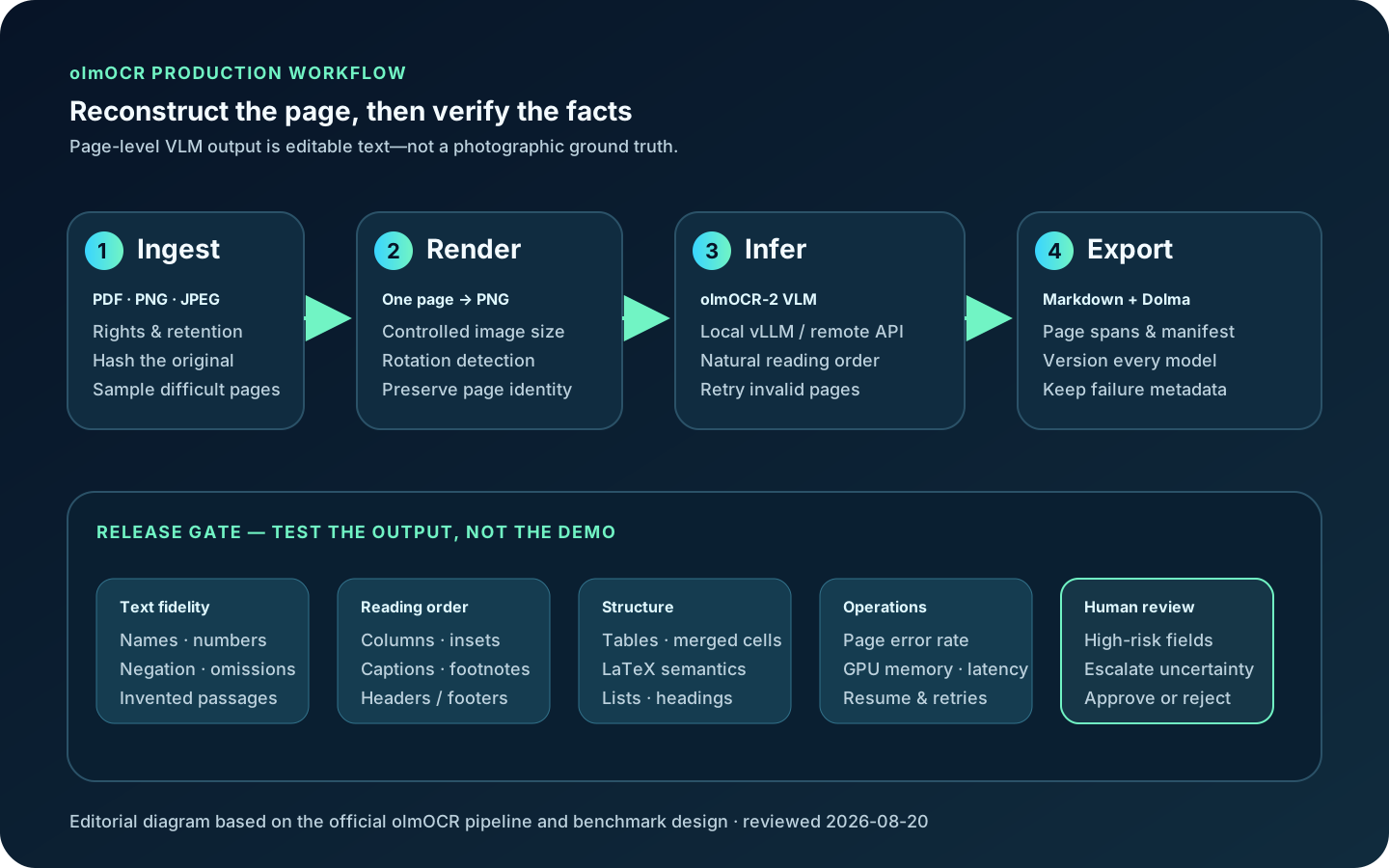
What happens to a page
| Stage | Current behavior | What can go wrong |
|---|---|---|
| Input | PDFs plus PNG/JPEG images; files may be local or referenced in a workspace | Encrypted, malformed, enormous or rights-restricted documents need separate handling |
| Render | Each PDF page becomes a bounded PNG; rotation can be corrected on retry | Tiny print, blur, compression, marginalia and extreme aspect ratios can lose evidence |
| Reconstruct | olmOCR-2 receives the page image and returns YAML front matter plus natural text | The VLM can omit, normalize or hallucinate content; a valid schema is not a factual guarantee |
| Validate/retry | The pipeline checks termination, context limits, parseability and rotation signals | Retries can return a different plausible error; page-error thresholds can hide gaps if unmonitored |
| Export | Page text is concatenated with page spans into Dolma JSONL; optional Markdown mirrors input paths | Cross-page tables, footnotes and headings may still require document-level reconciliation |
Anchoring: an important version boundary
The repository retains an anchor.py module that extracts a limited amount of native PDF text using engines such as pdftotext, PDFium or pypdf. Historically, this imperfect text could be included with the rendered image to help a VLM recover characters. The CLI still lists --target_anchor_text_len, but its help says it is not used for new models. The current main pipeline builds a no-anchoring prompt for olmOCR-2; native pdftotext appears as a fallback when model processing fails.
Therefore “olmOCR uses PDF anchors” is not a timeless product description. Anchoring is a technique and a retained code path, not the evidence path of every current inference. For born-digital PDFs, compare olmOCR output with direct text extraction anyway: agreement can catch hallucinations, while disagreement reveals reading-order, font-encoding or scan-layer problems. For image-only scans there may be no usable anchor at all.
Model, data, benchmark and license facts
| Component | Verified scope | Interpretation |
|---|---|---|
| Original training mix | The first paper describes 260,000 pages from more than 100,000 crawled PDFs, including graphics, handwriting and poor scans | Diversity is useful; it does not prove equal quality for every language, archive or form type |
| olmOCR-2 | Specialized 7B-class VLM, SFT plus reinforcement learning with verifiable unit-test rewards | The paper reports the largest gains in math, tables and multi-column layouts on its English benchmark |
| olmOCR-Bench | About 1,400 single-page PDFs with machine-checkable facts across math, tables, old scans, headers/footers, columns and tiny text | It tests important facts rather than only character edit distance; it is not your document distribution |
| Model card | FP8 is recommended for practical inference; BF16 is intended when further fine-tuning is needed | Measure quality and compatibility on your GPU/runtime; precision labels do not promise throughput |
| License | Toolkit and released olmOCR-2 weights are Apache-2.0; the model card also points to AI2 Responsible Use Guidelines | Check source-document rights, dependencies, base-model notices and your use case separately |
Do not turn the repository leaderboard into a universal accuracy claim. olmOCR-Bench is English and page-level, uses normalized fact tests, and intentionally emphasizes difficult categories. The original paper’s scale/cost experiment was tied to its 2025 stack and assumptions; GPU prices, model versions, retries, image size and provider token pricing change. The defensible metric is cost and error rate per accepted page on a dated private test set.
Installation and deployment choices
python -m venv .venv
source .venv/bin/activate
pip install "olmocr[gpu]"

# One PDF on a local GPU; also write Markdown
olmocr ./workspace --markdown --pdfs ./samples/report.pdf

# A controlled batch; globs are expanded by your shell
olmocr ./workspace --markdown --workers 2   --max_page_retries 3 --pdfs ./incoming/*.pdf

# Keep the lightweight client local, send page images to your own server
pip install olmocr
olmocr ./workspace --server https://inference.example/v1   --api_key "$OLMOCR_API_KEY"   --model allenai/olmOCR-2-7B-1025-FP8   --max_concurrent_requests 8 --markdown --pdfs ./incoming/*.pdf
Current package metadata requires Python 3.11 or newer. The GPU extra pins a vLLM/Torch/Transformers stack, so match the documented CUDA environment and test the exact lockfile. The README describes the model as GPU-requiring. Do not promise a supported CPU-only local path merely because generic Transformers can technically load weights. A remote OpenAI-compatible endpoint moves inference off the client, but it also sends rendered pages and document contents outside that machine.
| Deployment | Best fit | Main controls | Primary risk |
|---|---|---|---|
| Local single GPU | Private pilots and moderate queues | Pin model/runtime; cap workers and GPU memory; encrypt outputs | VRAM/CUDA compatibility and one-machine availability |
| Local multi-GPU | Large internal batches | Tensor/data parallel settings, resumable workspace, page manifests | More operational tuning; throughput can magnify silent errors |
| Self-hosted remote server | Shared inference inside an approved network | TLS, authentication, queues, quotas, no request-body logging | Centralized sensitive-document exposure |
| Third-party compatible API | Fast evaluation without owning GPUs | DPA/region/retention review, key isolation, concurrency limits | Provider terms, price and model alias can change |
| AI2 demo | Non-sensitive qualitative tryout | Use public or synthetic pages only | A demo is not a privacy-reviewed production service |
How to evaluate before a batch
- Sample by failure mode.Include born-digital PDFs, photos, skew, old scans, small text, multi-column pages, equations, tables, handwriting, mixed languages and blank/near-blank pages.
- Create page-level facts.Mark names, dates, totals, negatives, table relationships, equations, required phrases, forbidden header/footer strings and reading-order pairs.
- Run at least two paths.Compare olmOCR with direct PDF extraction or a different OCR/parser. Agreement is not proof, but disagreement is a useful review queue.
- Track omissions and inventions separately.A character metric can underweight a changed sign in an equation or one invented sentence.
- Measure operations.Record page latency, retries, failed pages, peak GPU memory, output tokens and cost per accepted page.
- Freeze a release manifest.Store the input hash, olmOCR release, checkpoint, precision, runtime, render size, retry settings and reviewer decision.
git clone https://github.com/allenai/olmocr.git
cd olmocr
pip install -e ".[bench]"
playwright install chromium
huggingface-cli download --repo-type dataset allenai/olmOCR-bench   --local-dir ./olmOCR-bench

# Convert with a supported runner, then score the generated text
python -m olmocr.bench.convert olmocr_pipeline   --dir ./olmOCR-bench/bench_data
python -m olmocr.bench.benchmark --dir ./olmOCR-bench/bench_data
The official benchmark is valuable for regression testing, especially after upgrades. Add your own private facts because production documents may be multilingual, form-heavy, handwritten, legally significant or visually unlike the benchmark. Never tune on the final holdout and then report that same set as an unbiased test.
Tables, formulas, scans and language limits
olmOCR can emit Markdown/HTML-like tables and LaTeX, but visual reconstruction is not semantic certainty. Check totals, row/column association, merged cells, superscripts, decimal separators, minus signs and equation variables. A table that looks cleaner than the scan may have silently normalized a value. Preserve the page image beside the structured result when downstream decisions depend on it.
Low-resolution or damaged scans impose an evidence ceiling. Upscaling cannot recreate absent ink. The model may use linguistic context to produce a plausible word; label it uncertain rather than treating fluency as confidence. Likewise, the benchmark is English-language and the first paper’s web-PDF mix does not establish uniform multilingual coverage. Build per-language test sets, particularly for vertical text, right-to-left scripts, rare characters and mixed-script documents.
Privacy and hallucination controls
Local execution can keep page images and text within your environment after weights are downloaded, but “local” is an architecture claim that must include caches, S3 workspaces, logs, crash dumps, telemetry and backups. Minimize retention, encrypt originals and outputs, restrict workspace access, redact logs and establish deletion. When using a remote server, rendered pages are payloads; treat them as the full document, not harmless thumbnails.
Schema validation only proves that a response can be parsed. Use blank-page and corrupted-page tests, forbidden-phrase detectors, length/coverage outliers, cross-engine comparison and human verification of high-risk fields. Do not let an LLM downstream “repair” uncertain OCR without retaining both versions and the source evidence.
olmOCR compared with adjacent tools
| Option | Choose it when | Output strength | Trade-off |
|---|---|---|---|
| olmOCR | Page-image understanding, equations, tables and natural reading order matter | Clean Markdown/plain text plus Dolma corpus records | GPU/VLM operations and generative error risk; limited positional structure |
| Marker | You want a hybrid parser, multiple formats, structured JSON/images or CPU/MPS modes | Markdown, JSON, HTML and chunks with document blocks | Model-weight license differs from Apache code; modes have different behavior |
| Docling | You need a broad document framework and unified structured representation | Lossless JSON plus Markdown/HTML and many input formats | Larger configurable stack; quality depends on selected pipeline/OCR/VLM |
| Tesseract | Deterministic character OCR, boxes/TSV/hOCR and broad trained language packs matter | Text and positional OCR formats | Layout, tables and natural reading order need additional components |
| Cloud Document AI | You need managed OCR, forms, key-value extraction, classification and operational SLAs | Structured vendor Document objects and specialized processors | Usage billing, vendor/data-boundary review and service-specific schemas |
Independent judgment:olmOCR is strongest when the desired artifact is a readable linearization for language-model consumption, not a pixel-addressable archival transcript. If a workflow needs coordinates, deterministic audit trails, form fields or document classification, use a structured parser/OCR or cloud processor—possibly alongside olmOCR. The best production design is often a router: direct extraction for clean digital pages, VLM reconstruction for visually complex pages, and human review for high-risk disagreements.
FAQ
Is olmOCR just Tesseract with a language model?
No. Tesseract recognizes text lines and can return positional formats. olmOCR renders a whole page and asks a document VLM to produce naturally ordered text, tables and formulas. The latter understands layout more broadly but can generate plausible errors.
Does current olmOCR-2 use native PDF anchor text?
The codebase retains anchor extraction, but the current new-model pipeline uses a no-anchoring prompt and the CLI marks the anchor-length option as unused for new models. Native text is still useful for fallback and independent verification.
Can it run without sending documents to a cloud?
Yes, with a compatible local NVIDIA GPU/vLLM setup and locally cached weights. Verify every storage and logging path. Using a remote OpenAI-compatible server sends rendered page content to that endpoint.
Does olmOCR preserve bounding boxes?
Its primary result is linearized natural text with page spans, not a word-level coordinate graph. Choose Tesseract, Marker JSON, Docling or a document AI service when positional provenance is a hard requirement.
Is it reliable for tables and formulas?
Those are explicit strengths and olmOCR-2 training targeted them, but there is no universal guarantee. Test cell relationships, totals, signs, variables and merged cells on your documents and retain the page for review.
Which languages are supported?
The model can process multilingual pages, but the official olmOCR-Bench is English and published evidence does not establish equal quality for every script. Evaluate each target language and layout independently.
How much GPU memory is required?
The project describes a 7B-class GPU model and recommends FP8 for practical inference, but does not publish one universal VRAM promise for every runtime and concurrency setting. Test the pinned model, image size, context and vLLM configuration on the target GPU.
Can the demo process confidential files?
Do not assume so. Use public or synthetic samples until you have reviewed the demo’s current privacy and retention terms. For confidential data, prefer an approved local or contracted environment.
Sources reviewed
- AI2 olmOCR repository and README
- Official release history
- olmOCR original paper
- olmOCR 2 paper: unit-test rewards
- olmOCR-2 model card and license
- olmOCR-Bench design and runner
- Official training guide
- Current page pipeline implementation
- Anchor-text implementation
- Python and GPU dependency metadata
- Apache-2.0 project license
- Marker official repository
- Docling official repository
- Tesseract official repository
- Google Cloud Document AI overview
Independent technical review: 2026-08-20. Latest visible stable release during review: v0.4.27. Model aliases, dependencies, provider prices and demo policies change; verify the pinned sources before production.