Independent verdict: MCP GSC is an MIT-licensed MCP server that lets compatible AI clients query Google Search Console data for SEO analysis. Its strongest fit is technical SEOs and site owners who want conversational analysis of their own first-party Google search performance. The main adoption mistake would be to treat an open repository or a high star count as proof that its recommendations, data or scores are correct for every site.
MCP removes export friction, not statistical ambiguity. A good answer should preserve dimensions, filters, row limits and dates so the analysis can be reproduced.
What MCP GSC actually does
MCP GSC should be evaluated as a data tool, not as a universal SEO platform. The verified repository description is: “Google Search Console Insights with Claude AI for SEOs” The distinction matters because a crawler, a structured-data library and an MCP connector solve different layers of the SEO workflow.
| Verified capability | Practical meaning |
|---|---|
| Connects an AI client to Search Console rather than scraping the public search results. | Check the official setup and version before relying on it. |
| Useful questions can be grounded in clicks, impressions, CTR, position, pages, queries and property access exposed by Google APIs. | Treat integrations as separate trust and cost boundaries. |
| Search Console is sampled, delayed and privacy-filtered in places; its average position is not a neutral rank tracker. | Benchmark the behavior on a representative site or account. |
Current GitHub evidence snapshot
The table below was captured on 19 October 2026. “Latest” means recent repository activity in this review, while “hot” is a blend of attention and activity. Neither term is a quality guarantee.
| Evidence | Observed | How to interpret it |
|---|---|---|
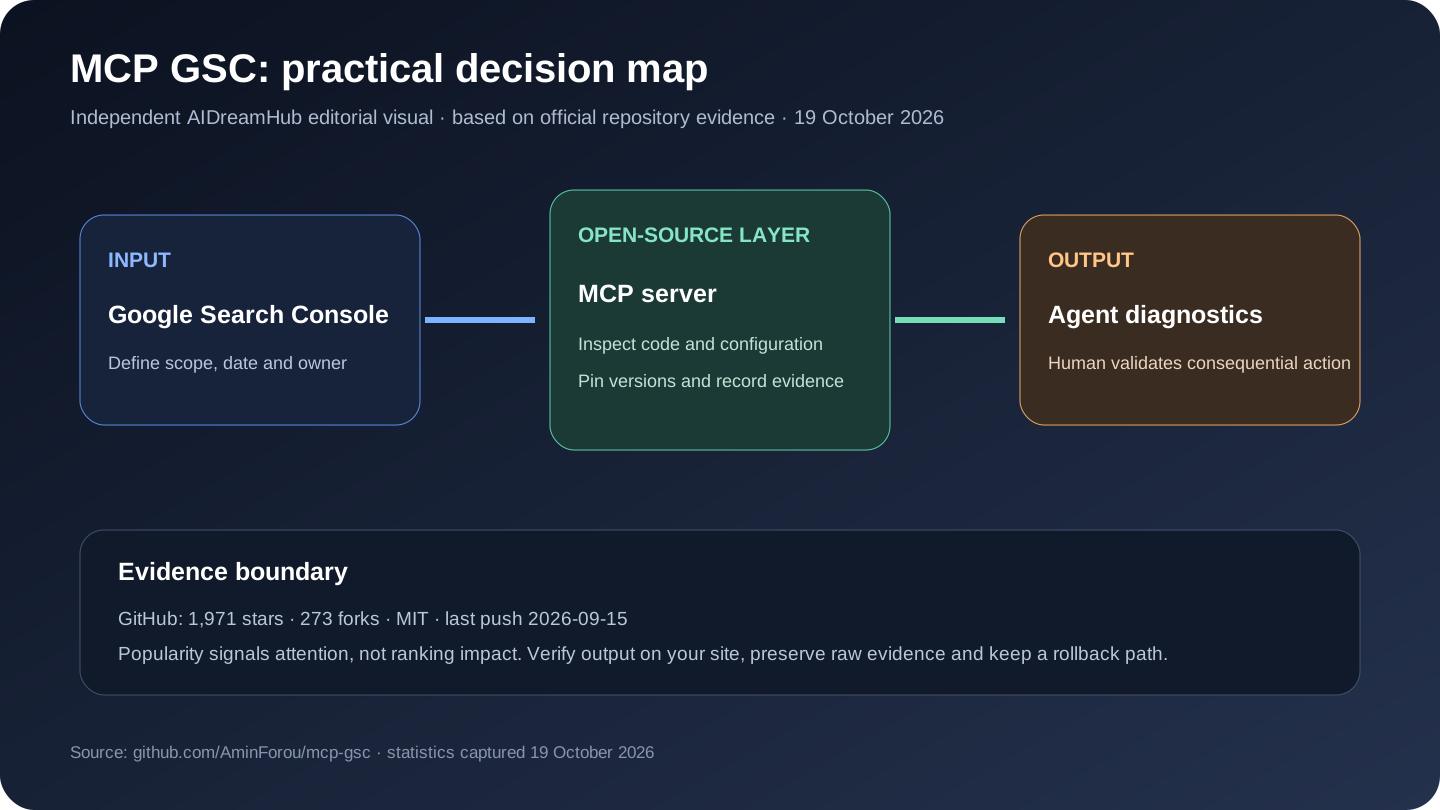
| Repository activity | 1,971 stars · 273 forks | Community attention and reuse signal; not proof of SEO outcomes |
| Last push | 2026-09-15 | Recent code activity; inspect releases and breaking changes before production |
| License | MIT | Confirm obligations for distribution, SaaS use and modifications |
| Primary stack | Python | Indicates the likely maintenance skills, not feature completeness |
Best-fit workflows
Best fit: technical SEOs and site owners who want conversational analysis of their own first-party Google search performance.
- Find query-page pairs with high impressions and weak CTR.
- Compare page or query groups across dates, countries and devices.
- Give an agent bounded read access for recurring diagnostic reports.
Practical starting point: Use a test property, request only necessary scopes, reproduce several results in the Search Console interface, and save query parameters with every conclusion.
Limitations, security and operating cost
- It cannot provide competitor keywords, a backlink index or a complete crawl.
- OAuth credentials and refresh tokens must be protected like production analytics access.
- An LLM can misread averages, seasonality or incomplete rows unless the query and date range are explicit.
Open source removes one form of lock-in, but it does not remove engineering time, model or API charges, browser/proxy costs, data-provider terms, authentication work, backups or upgrade risk. Map every external service and every write-capable action before production use.
MCP GSC compared with alternatives
| Option | Choose it when | Trade-off |
|---|---|---|
| SEO Skill | GSC plus GA4, Bing, crawl and optional providers | broader system, more components |
| SEOMonster | GSC, GA4, PageSpeed and guarded actions | more tools and credential setup |
| Search Console API scripts | deterministic scheduled exports | less conversational, easier to test |
The comparison is task-based, not a claim that one product is universally better. A narrow library may outperform a suite inside its framework, while a mature commercial crawler may be cheaper than maintaining an open tool at large scale.
A seven-step evaluation before adoption
- 1. Define one decision and a bounded test set before installing or connecting accounts.
- 2. Pin the repository revision or release and record the configuration used.
- 3. Verify several outputs against the live page, source console or another independent tool.
- 4. Separate deterministic observations from scores, estimates and model-written recommendations.
- 5. Measure false positives, missing coverage, runtime and provider cost on a realistic sample.
- 6. Use least-privilege credentials; require approval for edits, submissions, purges or publishing.
- 7. Keep raw exports and a rollback plan so the result can be audited after an update.
Our independent take
MCP removes export friction, not statistical ambiguity. A good answer should preserve dimensions, filters, row limits and dates so the analysis can be reproduced. That is also the decision boundary: keep the tool if it produces reproducible evidence and reduces work on a real site; reject it if the team mainly receives more scores, prose or issue volume without clearer decisions.
Frequently asked questions
Is it really open source?
The GitHub API reported MIT on 19 October 2026. Review the repository's license file and dependency licenses for the exact rights and obligations. A connected cloud API or hosted service can have separate terms even when the client code is open.
Does GitHub popularity mean it improves rankings?
No. Stars and forks indicate attention and reuse, not ranking lift, data accuracy or suitability for a particular site. Use a controlled evaluation with Search Console, analytics and manually verified output.
Who is it best for?
MCP GSC is best suited to technical SEOs and site owners who want conversational analysis of their own first-party Google search performance. It is a poor fit when the team cannot operate its runtime, verify its evidence or own the permissions it requests.
What should be tested first?
Use one representative workflow: Find query-page pairs with high impressions and weak CTR. Record inputs, raw output, time, failures and any external cost, then compare with the team's current method.
Can it replace a commercial SEO suite?
Usually only for a defined slice of work. Open-source workflow and audit tools rarely include the same proprietary backlink index, historical SERP coverage, support organization, permissions and polished client reporting as a mature paid suite.
How to Use MCP GSC: Quick Start
This workflow is condensed from the project's official README and documentation. Run it first on a test site, test property or local environment; check the linked source again when versions change.
Prerequisites
- A Google Cloud project with the Search Console API enabled
- An OAuth desktop client or service-account JSON file
- uv/uvx and an MCP-compatible client
Install and run
# Verify uvx
uv --version

# Codex ~/.codex/config.toml
[mcp_servers.gscServer]
command = "/FULL/PATH/TO/uvx"
args = ["mcp-search-console"]
enabled = true
env = { GSC_OAUTH_CLIENT_SECRETS_FILE = "/full/path/to/client_secrets.json" }
First-use workflow
- Enable the Search Console API and create OAuth desktop credentials; use a service account only for headless automation.
- Install uv and find the full uvx path.
- Add mcp-search-console to the client configuration with the credential-file path.
- Fully restart the client, complete Google authorization and list accessible properties.
- Ask for a small date range and reproduce the clicks, impressions and dimensions in Search Console.
How to confirm it worked
The MCP server lists the expected property and a small query returns the same filtered totals as the Search Console interface.
Before production use
Protect refresh tokens and credential JSON files. Save dimensions, filters, dates and row limits with every conclusion because Search Console data can be delayed or filtered.
Official Quick Start source: AminForou/mcp-gsc README.
Sources reviewed
Editorial review updated 19 October 2026. Repository statistics, documentation, dependencies and hosted-service terms can change. Verify the linked official sources before installation, procurement or deployment.