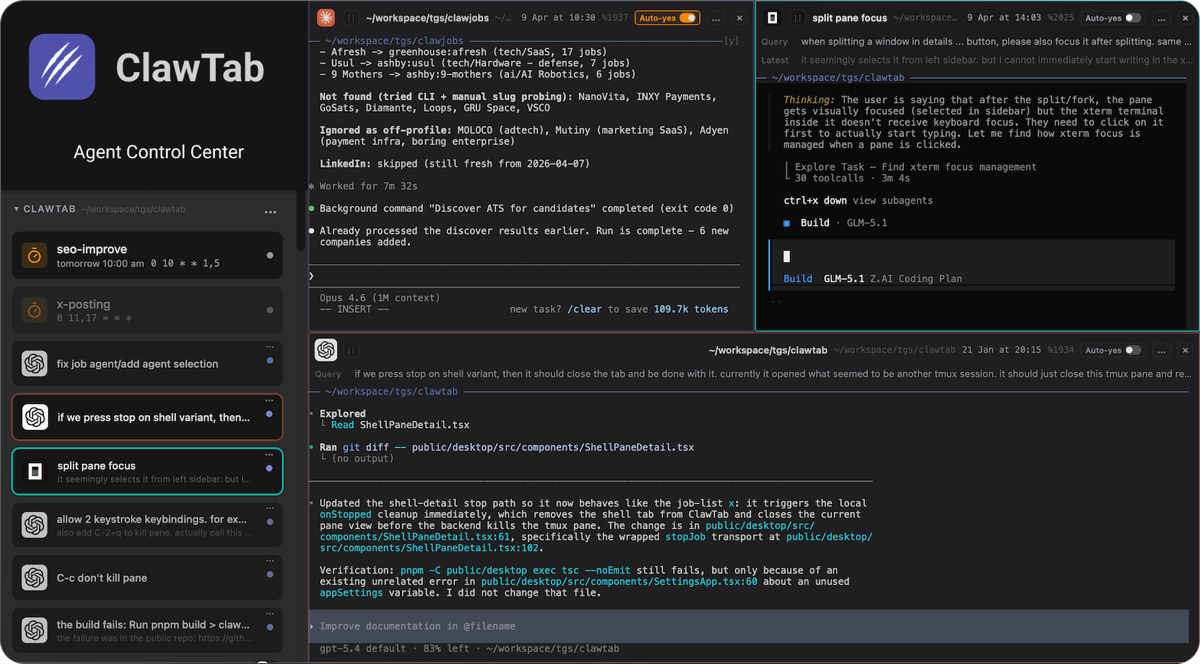
ClawTab is a tmux-native control plane for running and supervising Claude Code, Codex, OpenCode and ordinary shell jobs on macOS. Its central design is unusual and useful: the agent remains in a real tmux pane, a headless daemon adds scheduling and operational state, and the terminal, cwtctl CLI, cwttui TUI, optional Tauri GUI, browser, iOS app and Telegram act as clients of that same session.
This makes ClawTab more than a terminal skin, but less than a cloud coding-agent platform. It does not supply the model, review code, isolate untrusted commands or replace source control and CI. Its value appears when session operations—finding blocked agents, preserving terminals, routing approvals, scheduling jobs and separating credentials—have become a larger problem than starting another agent.
Architecture: one pane, several control surfaces
| Layer | Owns | Operational implication |
|---|---|---|
| tmux pane | Agent process, terminal state, scrollback and working directory | Closing the GUI does not terminate the session; normal tmux remains usable |
| ClawTab daemon | Discovery, schedules, metadata, question detection, relay, notifications and PTY subscriptions | Runs through launchd and becomes a privileged background control point |
| cwtctl / cwttui | Headless job, pane, secret, Telegram and daemon operations | Automation can work without the visual app |
| Desktop GUI | Visual splits, mind map, settings, history and terminal views | Optional client, not the durable runtime |
| Remote / iOS / Telegram | Live viewing, notifications, questions and input routed through a relay | Convenient approval path that expands authentication and network risk |
The architecture avoids a common failure mode: a desktop application owns a hidden pseudo-terminal, then loses the agent when the window crashes or closes. ClawTab instead treats the tmux pane ID as stable session identity. Moving from terminal to phone should continue the same process rather than create a duplicate agent with different context.
What it adds beyond plain tmux
Plain tmux already provides detachable terminal sessions, windows, panes, scrollback and scripting. ClawTab adds agent-specific metadata and operations: working, asking and idle markers; task-based titles; grouped jobs; cron schedules; question detection; remote answers; per-pane auto-yes; secret injection; notifications; restore context; and visual maps. These features are valuable only if they remove real coordination cost.
| Situation | Plain tmux is enough when… | ClawTab becomes useful when… |
|---|---|---|
| Two interactive agents | You can name windows and inspect both frequently | You need mobile alerts or consistent state labels |
| Eight or more sessions | A disciplined custom status bar and scripts already work | Questions, histories and working states are getting lost |
| Scheduled work | cron plus logs and alerts are already reliable | You want schedules to open inspectable agent panes |
| Remote supervision | SSH/VPN and tmux meet the need | One-tap questions and mobile views justify a relay |
| Mixed providers | Every CLI can be managed identically by convention | Provider-specific restore and question state need normalization |
Installation and first validation
The official quick start recommends Homebrew: brew install --cask tonisives/tap/clawtab. It installs the GUI, cwtctl and cwttui. The current source-build requirements are macOS 10.15 or newer, tmux, Rust, Node.js and pnpm; a supported agent CLI is also required. The daemon is installed and checked with cwtctl daemon install and cwtctl daemon status.
Do not start with an important repository. Create a disposable test project, install one provider CLI, and run a harmless job that lists files and writes a temporary result. Verify detach/reattach, GUI closure, daemon restart, question detection, cancellation and history before adding schedules or remote control. Keep the agent’s native permission prompts enabled during this stage.
- Record installed ClawTab, tmux and provider versions.
- Confirm which launchd user owns the daemon and inspect its logs.
- Create one read-only job in a non-sensitive repository.
- Close every optional client and verify the tmux process survives.
- Trigger a safe question and test response routing.
- Stop the job and verify child processes are not orphaned.
- Export or document recovery steps before adding production work.
Job types and scheduling discipline
The documentation describes binary jobs, prompt-based Claude jobs and project-folder jobs. Folder instructions live under ~/.config/clawtab/jobs/, with job.md for a job and context.md for shared project context. Jobs can run from the GUI, cwtctl, cwttui, Telegram or cron. Central configuration is convenient, but it can silently diverge from version-controlled repository instructions.
| Job type | Good use | Guardrail | Evidence of success |
|---|---|---|---|
| Binary | Deterministic lint, backup or report script | Explicit executable path, timeout and exit-code handling | Immutable log plus artifact checksum |
| Prompt file | Repeatable research or maintenance request | Version prompt and prohibit unreviewed mutations | Structured output and source links |
| Folder agent | Repository-scoped code task | Dedicated worktree, branch and least-privilege credentials | Diff, tests and reviewable commit |
| Remote-triggered | Approved operational response away from desk | Strong authentication and narrow command catalog | Actor, time, request and resulting pane ID |
| Cron agent | Bounded recurring audit | No open-ended auto-approval; concurrency and spend limits | Run status, duration, cost and explicit failure alert |
Prevent overlapping schedules unless the job is demonstrably safe to run concurrently. A stalled previous agent plus a fresh cron invocation can edit the same branch, compete for locks or duplicate external actions. Add a project lock, maximum runtime and escalation path. A terminal marked “working” is not proof of useful progress.
Secrets: injection reduces leakage, not authority
ClawTab says it can read secrets from macOS Keychain and gopass, assign them per job and inject them as environment variables without storing them in job configuration or logs. That is better than pasting tokens into job.md, but an injected secret is still available to the job process and potentially its children. A compromised dependency, prompt-injected tool or careless diagnostic command may exfiltrate it.
- Create separate service accounts for unattended agents; do not inject a developer’s broad personal token.
- Use repository-, project- and environment-scoped credentials with short lifetimes and spend limits.
- Separate read-only research jobs from deployment, package publishing and production administration.
- Audit shell startup files, inherited environment variables and child processes.
- Redact terminal output before remote streaming or support sharing; scrollback can contain secrets even if ClawTab did not log them intentionally.
- Rotate credentials after device loss, suspicious remote activity or an untrusted job.
Remote access changes the threat model
Remote control routes terminal output and input between the local daemon and a relay, then to a web or mobile client. The official options are a free self-hosted relay or hosted ClawTab Remote at $4.99 per month. Self-hosting removes the vendor-hosted relay but adds patching, TLS, authentication, availability and logging responsibilities; it does not automatically make the system secure.
| Risk | Why it matters | Control to test |
|---|---|---|
| Account takeover | A remote client may type into privileged terminals | Authentication strength, device revocation and session expiry |
| Relay exposure | Terminal streams can include code, paths, prompts and secrets | Transport design, retention, operator access and incident policy |
| Notification leakage | Lock-screen previews may reveal repository or customer data | Redacted notification content and device policy |
| Wrong-pane action | A short mobile prompt may lack enough context | Show project, provider, command and risk before accepting |
| Lost phone | Existing sessions may remain authorized | Remote sign-out, token revocation and MDM controls |
| Self-host drift | An outdated relay can become the weakest component | Pinned release, update cadence, backups and monitoring |
Before enabling Remote, inspect the current privacy documentation and deployment architecture, inventory what pane output may contain, and perform a lost-device drill. If the workflow handles regulated or client-confidential code, security review should cover the daemon, relay, clients and provider CLIs as one system.
Auto-yes is an execution policy, not a convenience toggle
Per-pane auto-yes can keep an unattended agent moving, but it collapses the human checkpoint that many coding agents use as a safety boundary. Never enable it merely because a session asks too many questions. First reduce the agent’s filesystem, shell, network and account privileges so that an incorrect approval has bounded impact.
Suitable auto-approved work is narrow and reversible: reading a repository, running a test suite, creating artifacts in a disposable directory or editing a dedicated worktree. Keep it off for deletion, deployment, production data, payments, credential changes, public publishing, messages and destructive database migrations. The decisive question is not “Do we trust the model?” but “What is the worst action this process can perform without another control?”
A safe multi-agent operating model
Give each coding agent a separate worktree and branch. Assign one task owner, define allowed paths and acceptance tests, and require a human or independent CI gate before merge. Shared panes are observable, but shared working directories are still collision-prone. Do not let two agents format, migrate or regenerate the same files concurrently.
| Metric | Useful definition | Warning signal |
|---|---|---|
| Blocked time | Minutes from question detected to reviewed response | Fast answers but rising wrong approvals |
| Completion rate | Jobs meeting acceptance tests without manual rescue | “Finished” states with failing CI |
| Review load | Human minutes per accepted change | More agents create more low-value diffs |
| Collision rate | Jobs with overlapping files, locks or branches | Repeated conflict resolution |
| Cost per accepted task | Provider spend plus review time per merged result | High parallelism raises retries and waste |
| Recovery time | Time to restore after daemon, relay or device failure | Sessions survive but ownership/context is unclear |
Alternatives
| Option | Best fit | Tradeoff versus ClawTab |
|---|---|---|
| Plain tmux | Small session count and terminal-native operators | Less metadata, mobile approval and packaged scheduling |
| SSH + tmux + scripts | Teams with mature remote access and automation | More assembly and maintenance, fewer product abstractions |
| Claude Code Agent Teams | Coordinated Claude teammates inside an interactive task | Provider-specific and different from independent durable processes |
| Cursor | Editor-first interactive development and built-in parallel agents | Not centered on arbitrary durable tmux panes |
| CI runners | Deterministic, auditable non-interactive automation | Poor fit for conversational terminal sessions |
| Cloud agent platforms | Managed isolation, fleet policy and team workflows | Less local-terminal continuity and potentially higher cost/lock-in |
Frequently asked questions
Does ClawTab replace Claude Code or Codex?
No. It launches and supervises supported CLIs; provider authentication, model behavior, limits and billing remain separate.
Does the GUI need to stay open?
No. The launchd daemon owns background monitoring, schedules, relay connectivity and job operations.
Is ClawTab free?
The local desktop, CLI, TUI and self-hostable relay are MIT licensed and free. The current hosted Remote price is $4.99 per month.
Is self-hosting automatically private?
No. It changes who operates the relay, but your team must secure authentication, transport, updates, logs, backups and server access.
Should auto-yes be enabled?
Only for narrowly scoped, reversible jobs running with least privilege. Keep explicit approval for consequential actions.
Who benefits most?
macOS users already managing enough terminal agents that blocked-session visibility, scheduling and remote response save measurable time.
Primary sources
- Official ClawTab overview, installation and pricing
- Official quick-start documentation
- Official source repository and architecture overview
- Official MIT license
- Official daemon and tmux engineering explanation
- Official tmux project wiki
- OWASP Secrets Management Cheat Sheet
Last reviewed July 25, 2026. ClawTab is developing quickly; confirm the current release, supported providers, relay design, privacy terms and price before deployment.