Prepare a script that reveals pronunciation problems
Use a short paragraph with one product name, one number and a sentence that needs a natural pause. The same sample makes voice comparisons meaningful. Rewrite dense written prose into spoken sentences before generating it.
Expand ambiguous abbreviations and write numbers in the form you want spoken when necessary. Keep an untouched copy of the original script so pronunciation edits do not quietly change meaning.
Generate and download the first voiceover
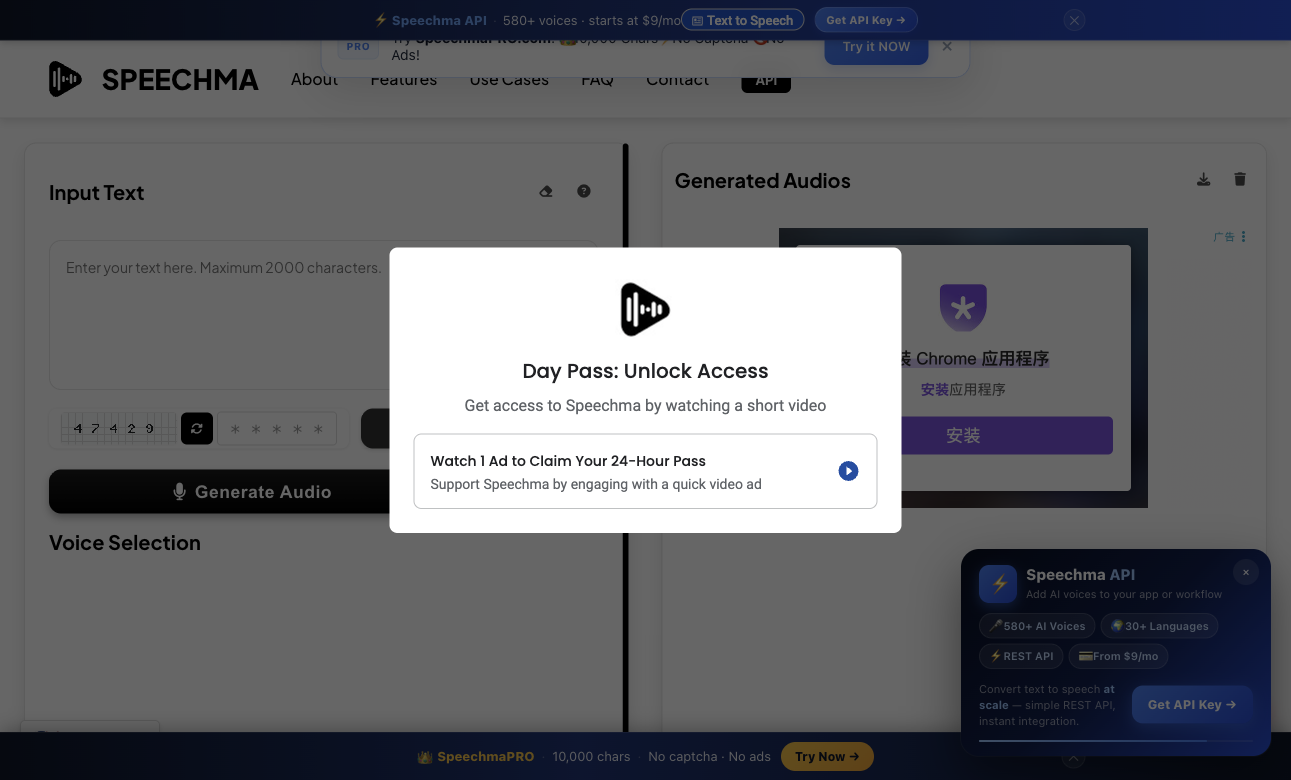
The public Speechma interface includes a text field, voice selection, a security challenge and generated-audio controls. Use the live character counter rather than assuming that a whole article will fit in one request.
During our page review, the site displayed an ad-supported day-pass prompt. Access steps can therefore include watching an advertisement in addition to the security challenge; allow time for the current on-screen flow.
- Paste the short script into the input field.
- Choose the intended language, voice and regional accent.
- Complete the displayed security challenge yourself when requested.
- Generate the audio and listen to the entire sample.
- Download the accepted audio and save the script and voice choice beside it.
Review words, pacing and edits separately
A voice can sound natural while misreading a name or changing the emphasis of a sentence. Listen without reading once, then compare against the script word by word.
| Check | Listen for | Fix |
|---|---|---|
| Pronunciation | Names, abbreviations and numbers | Adjust spelling or phrasing without changing meaning |
| Pacing | Rushed clauses and unnatural gaps | Simplify sentences and revise punctuation |
| Consistency | Volume or tone changes across segments | Reuse one voice and stable settings |
| Editing | Clicks, abrupt starts and clipped endings | Trim carefully and keep room at the boundaries |
Split a longer script at sentence boundaries
Divide long narration into sections that fit the live request limit. Use meaningful filenames and keep the order in a text document. Join only accepted segments in your audio or video editor.
Listen across joins because a sentence can sound complete alone yet awkward beside the next clip. Keep the same voice, pronunciation rules and volume target throughout the project.
Keep your own copy and check the applicable offer
Speechma says generated files are retained in browser storage until that storage is cleared or the files are removed. Download a permanent copy before closing out the project or changing browser data.
The site describes its browser service as free and offers a separate paid API. Check the current service terms for your workflow and retain permission for the text you convert. Provider licensing statements do not establish rights to someone else's script or voice likeness.
Common questions
Can I use the browser tool and API interchangeably?
They are separate access paths with their own limits and offers. The public site describes free browser use and paid API plans; check the current API documentation before building automation.
Where should I save the audio?
Download it to your project folder and keep a backup. Do not rely on browser storage as the only copy.
Does a good voice guarantee a good narration?
No. Review factual wording, pronunciation, pace and the joins between segments. A short accepted sample is the best starting point for a longer script.
Official sources
We check official documentation, explain limits and link to our sources. These are editorial guides, not scored hands-on benchmarks. Plan availability can change; check the linked provider before paying.