Self-Operating Computer review: an influential desktop-control experiment with a very large trust boundary
Self-Operating Computer is an open-source Python framework from OthersideAI that lets a multimodal model observe a screen and choose mouse and keyboard actions. Released in November 2023, it was an early public demonstration of general computer use. It is better evaluated today as a research/developer framework than as a finished personal assistant: installation grants code and a remote model an unusually powerful view of the desktop.
The latest formal release we verified is v1.5.8 from 28 February 2025. The repository is not archived; its latest verified commit on 19 September 2025 corrected a README typo. That signal is neither abandonment nor fast active development. By August 2026, teams should test current operating-system permissions, model endpoints and dependency issues on a disposable machine rather than assume the README's historical commands and provider notes remain exact.
The project is MIT licensed and supports macOS, Windows and Linux with an X server according to its README. macOS setup asks Terminal for Screen Recording and Accessibility permissions. Those permissions are the core product fact: the framework can see sensitive pixels and generate system input. A successful demo proves visual grounding, not tenant isolation, policy enforcement, action integrity or production readiness.
Current project status
| Signal | Verified state | Decision |
|---|---|---|
| Latest release | v1.5.8 · 2025-02-28 | Pin version and dependencies; test on current OS |
| Latest commit | fac568e · 2025-09-19 · README typo | Low recent feature signal; inspect open issues |
| Archived | No | Not the same as a support SLA |
| License | MIT | Model APIs, websites and data have separate terms |
| Observation | Screenshots; OCR and Set-of-Mark modes | Pixels may contain credentials and private data |
| Action | Mouse and keyboard through local OS automation | Can click, type, submit, delete or send |
| Models named in README | GPT-4o/4.1, o1, Gemini, Claude 3, Qwen-VL, LLaVA | Some names/instructions are historical; verify live APIs |
| Platforms | macOS, Windows, Linux + X server | Permissions and coordinates differ |
How the loop works—and where it breaks
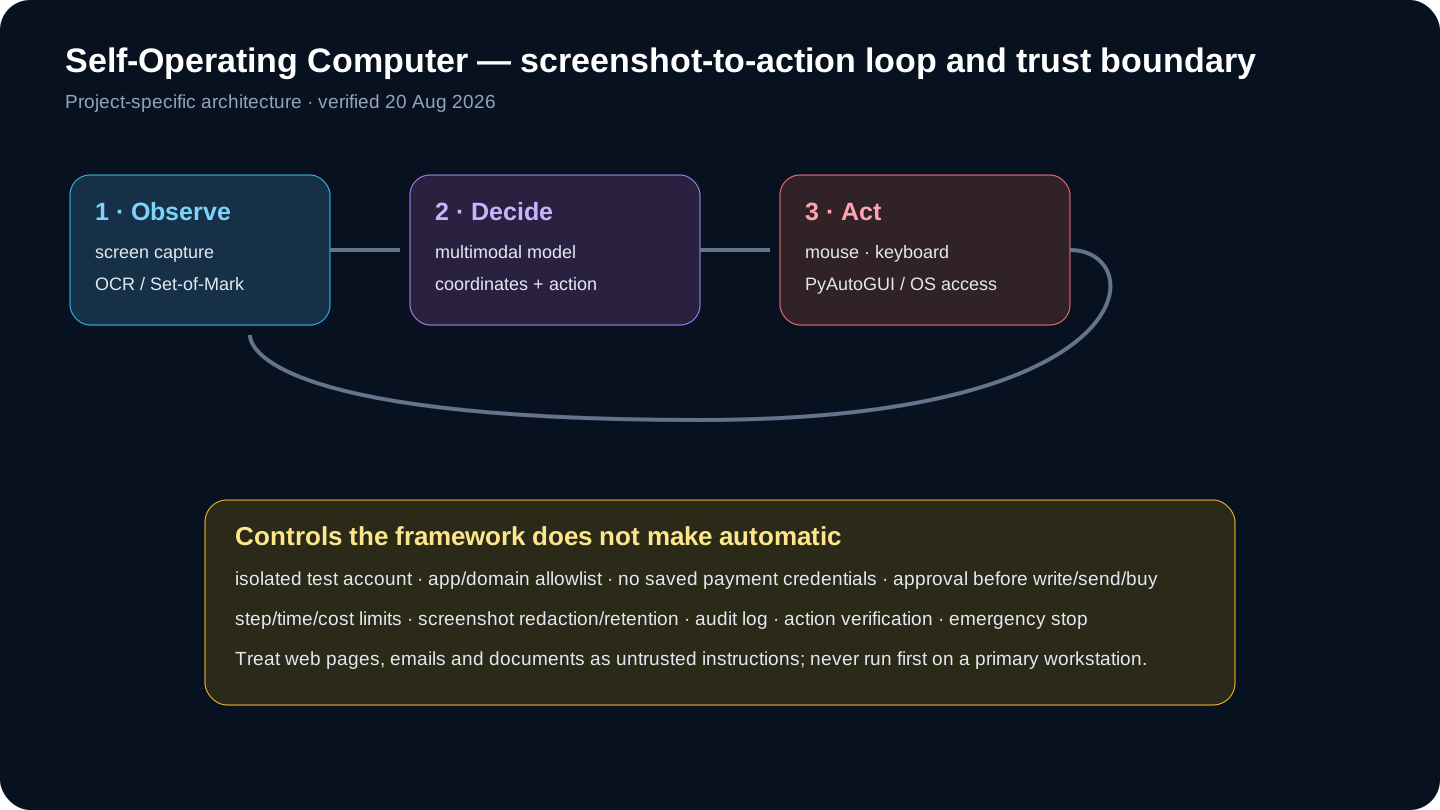
The loop is simple: capture the current screen, optionally enrich it with OCR coordinates or Set-of-Mark overlays, ask a vision model what action to take, execute the click/type/keypress, then capture the next state. This makes it application-agnostic, because it does not need each app's API. It is also slow and brittle: resolution, scaling, pop-ups, animation, hidden windows, focus changes and ambiguous icons can move the target between observation and action.
OCR helps when visible labels map cleanly to coordinates; Set-of-Mark can improve grounding by labeling detected regions. Neither method understands the business meaning of a control. A correctly located “Send,” “Delete” or “Buy” button can still be the wrong action. Every consequential step needs semantic validation from application state or a human, not confidence in pixel coordinates.
Model choice changes grounding, latency, price, privacy and supported tool semantics. The README's model list mixes current and historical names and warns that local LLaVA error rates were very high. Treat every mode as an experiment. Build a private evaluation set on the exact display size, language, theme and applications you use; provider benchmark claims do not establish performance on your desktop.
A safe evaluation workflow
- Create a disposable VM or test OS account with no personal credentials, files, browser sync or payment methods.
- Pin v1.5.8, Python and dependencies; record OS, display scaling, model ID and provider settings.
- Grant only required Screen Recording/Accessibility permissions, and revoke them after the test.
- Define 30–50 short tasks with expected screenshots, actions, terminal states and forbidden actions.
- Start with read-only navigation; log screenshots, proposed action, coordinates, model latency, tokens and result.
- Add app/domain/action allowlists, step/time/cost ceilings, emergency stop and confirmation gates.
- Test pop-ups, moved windows, dark mode, multiple displays, slow pages, prompt injection and wrong-account cases.
- Measure task success, false action, recovery, approval frequency, latency, cost and sensitive-data exposure.
- Only then test reversible writes in a sandbox; use idempotency and verify state after each action.
- Prefer an API, Playwright or RPA selector when it can perform the same task; schedule dependency/security review.
Security, privacy and production limits
| Risk | Control | Residual issue |
|---|---|---|
| Wrong coordinate | Fixed resolution, re-observe, post-action check | UI can move after screenshot |
| Prompt injection | Treat pixels as data; allowlist apps/actions | Model may follow hostile text |
| Credential exposure | Test account, no password manager, screenshot redaction | Pixels can reveal secrets |
| Irreversible action | Human approval and reversible sandbox | Clicks can submit immediately |
| Runaway loop | Step/time/token/cost caps + kill switch | Retries amplify mistakes |
| Cross-app drift | Single-app focus and process/window verification | OS focus may change |
| Supply chain | Pin package/hash and inspect dependencies | Local automation code has desktop privilege |
| Weak audit | Store action proposal/result without hidden reasoning | Screenshots still need retention controls |
Run first inside a disposable VM or separate OS account with no personal files, browser sync, password manager, cloud drive, developer keys or saved payment methods. Restrict outbound domains, create test-only SaaS accounts and put harmless sample data on screen. OS-level permission prompts are not granular authorization: once Terminal has accessibility control, prompt instructions alone are a weak boundary.
Screenshots sent to a hosted multimodal provider may include emails, tokens, medical or financial records, notifications and unrelated windows. Map which provider receives each screenshot, its region, retention and training policy. Crop or redact where possible, close unrelated apps, disable notifications and define deletion for local screenshots/logs. A local model changes the network boundary but not the risk of malicious content or mistaken input.
Web pages, emails and documents can contain prompt injection telling the agent to ignore the task, reveal data or click a dangerous control. Keep task instructions separate from observed content, deny terminal and password-manager access, allowlist apps/domains/actions, and require confirmation before login, sending, purchasing, deletion, uploads, permission changes or legal acceptance. Verify the post-action state after every write.
Alternatives and independent verdict
| Alternative | Best fit | Trade-off |
|---|---|---|
| Self-Operating Computer | Learning and testing general desktop vision loops | Open source/flexible; minimal production controls |
| Claude Computer Use | Current Anthropic model/tool contract and reference implementation | Provider dependency; still requires sandbox and approvals |
| OpenAI computer use / ChatGPT agent | Managed current computer/browser capability | Hosted boundary and product limits |
| Browser Use | Open-source browser-focused agent workflows | Less suited to arbitrary native desktop apps |
| Playwright | Known web flows with DOM selectors and repeatable tests | Not general visual desktop control |
| UiPath / enterprise RPA | Governed business automation, credentials and audit | Higher setup/licensing; selectors still require maintenance |
| Native APIs / scripts | Stable systems with supported interfaces | Most reliable, but not available for every app |
Our judgment: Self-Operating Computer deserves credit as an early, readable experiment and remains useful for learning coordinate-based computer-use loops. It is a weak default for reliable automation of known applications: Playwright, native APIs or RPA selectors are faster, testable and easier to authorize. Use visual computer control only where no structured interface exists, and keep the blast radius smaller than the value of the task.
Compared with modern computer-use offerings, the project provides source-level flexibility and model experimentation but little managed safety or operational infrastructure. Claude Computer Use and OpenAI computer-use models supply current model/tool contracts; Browser Use specializes in browser agents; Playwright and UiPath favor structured automation. None makes untrusted screen content safe automatically, but they differ greatly in isolation, observability and reproducibility.
Frequently asked questions
Is Self-Operating Computer safe on my main laptop?
Do not make the first test on a main laptop. Use a disposable VM or isolated account without personal files, synced browser data, saved credentials or payment methods, and revoke OS permissions afterward.
What is the current version?
The latest formal release verified on 20 August 2026 was v1.5.8, published 28 February 2025. Pin it and verify current dependencies and model endpoints.
Does it work offline?
The LLaVA/Ollama path can keep model inference local, but the README warns of high error rates. Other modes send screenshots/prompts to hosted providers. Local does not remove action or prompt-injection risk.
Why does it need Accessibility and Screen Recording?
Screen Recording lets it observe pixels; Accessibility lets the process produce system input. Together they create the desktop-control capability and a large trust boundary.
Is OCR reliable enough for production?
OCR can improve label-to-coordinate grounding, but it cannot decide whether the action is authorized or correct. Dynamic UI and semantic ambiguity remain.
How is it different from Playwright?
Self-Operating Computer acts through pixels, mouse and keyboard across apps. Playwright uses structured browser/DOM interfaces, which are generally more deterministic for known web workflows.
Which tasks are reasonable?
Low-risk, reversible, short tasks in a sandbox: navigating a demo app, filling test forms or benchmarking visual grounding. Avoid money, deletion, secrets and legal commitments.
Is the project actively maintained?
It is not archived, but the latest verified release was February 2025 and latest commit September 2025. Evaluate issue activity and compatibility rather than assuming a support cadence.
Sources
- Official repository
- Official README and installation
- Official releases
- Official commit history
- MIT license
- PyPI package
- OpenAI computer-using agent
- Anthropic computer-use documentation
- Browser Use documentation
- OSWorld benchmark
Independent review: 20 August 2026. Model names, API access, prices and OS permissions change; verify live official documentation before installation.