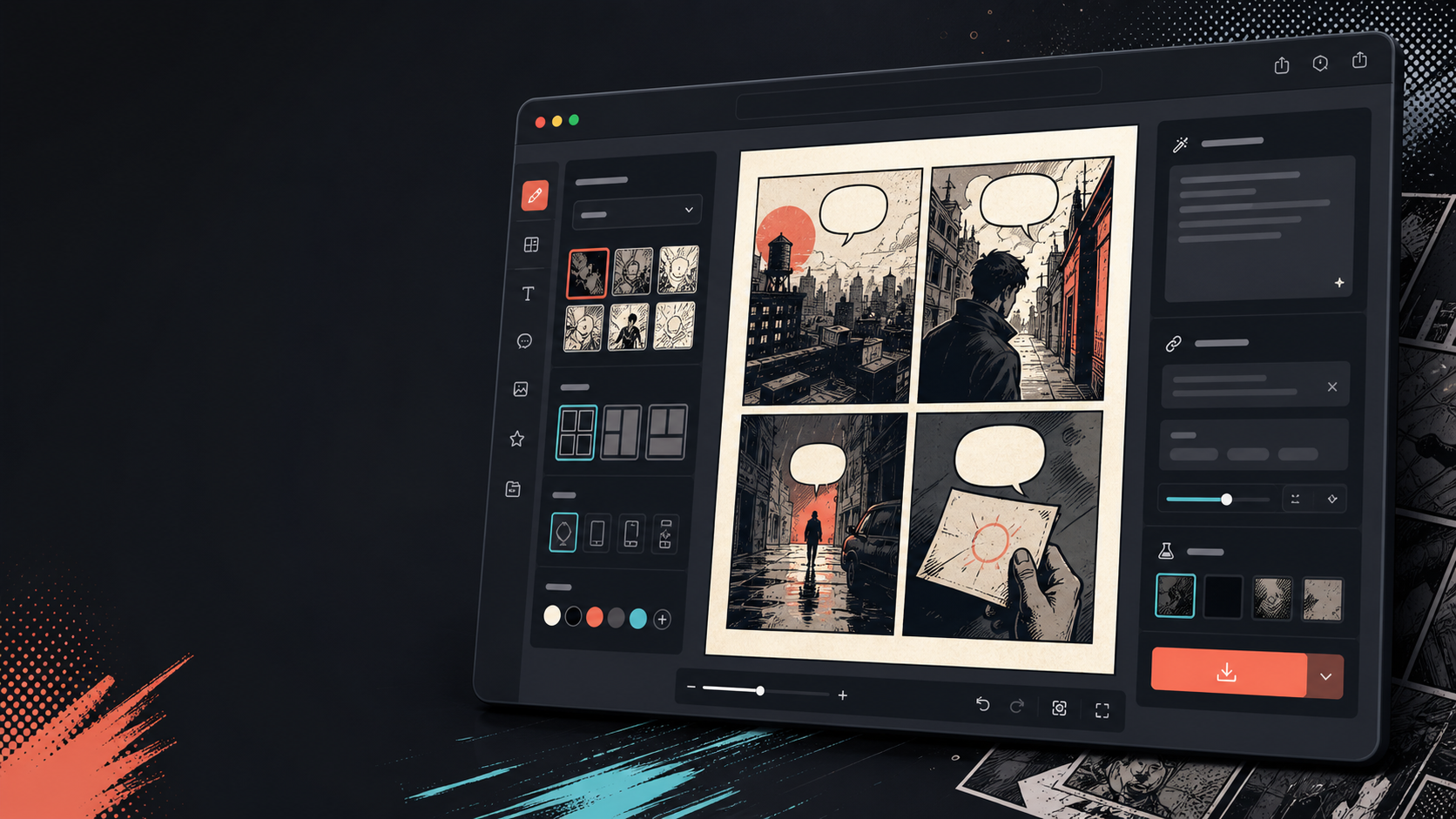
Comics Maker is a browser workspace for turning one scene into a comic draft. It combines a short scene brief, style and character references, automatic story beats, generated panel images, draggable speech bubbles, adjustable layouts and JSON project export. The current editor labels itself Beta and offers 2×2, three-panel, single-panel, Webtoon and diagonal formats.
That scope matters. It is most useful as a visual-story planning and iteration tool—not as a one-click replacement for scripting, art direction, lettering, factual review or print production. A good result begins with a scene whose change can be shown in a few panels. A vague request for an entire graphic novel usually produces attractive fragments without readable cause and effect.
What the editor actually does
| Stage | Built-in contribution | Human decision still required |
|---|---|---|
| Scene definition | Accepts a scene brief of up to 1,600 characters plus style, tone and production notes | Choose one dramatic change, audience, setting and visible action |
| Character setup | Add a recurring-character reference by upload or AI generation | Approve identity, clothing, props, age, likeness rights and reference quality |
| Beat planning | Builds a storyboard such as hook, discovery, turn and reaction | Check causality, pacing and whether every panel earns its space |
| Panel generation | Generates or regenerates selected panel drafts | Reject continuity errors, illegible objects, unsafe imagery and false details |
| Page composition | Offers multiple layouts, divider adjustment, zoom and image positioning | Create reading order, emphasis, gutter rhythm and safe balloon areas |
| Dialogue | Adds speech bubbles that can be dragged on the panel | Write, proofread, localize and letter dialogue for real reading size |
| Handoff | Exports a project JSON and retains generation history | Archive approved images and specifications; prepare final publishing files elsewhere if needed |
The strongest workflow: one scene, one visible change
Start with a sentence that can be photographed: “A junior mechanic opens a silent delivery drone, finds a handwritten map, hides it when her supervisor enters, then decides to follow it.” It identifies a character, place, object, interruption and decision. By contrast, “make an exciting cyberpunk adventure about courage” supplies mood but almost no panel logic.
A practical brief uses four fields: who is present, where the action happens, what visibly changes, and why the final reaction differs from the opening. Add only details that must remain stable: jacket color, distinctive tool, weather, time of day and the object that drives the scene. Long adjective lists compete with story actions and make continuity harder.
| Panel job | Question to answer | Example visual instruction | Failure to reject |
|---|---|---|---|
| Hook | Why should the reader enter? | Wide workshop view; the inactive drone flashes once under the bench | Generic portrait with no story object |
| Discovery | What new information appears? | Close-up: mechanic lifts the panel and sees a folded red map | Map changes color or appears before discovery |
| Turn | What creates pressure? | Supervisor silhouette crosses the doorway; mechanic conceals map | Character position makes the concealment impossible |
| Reaction | What decision or consequence closes the beat? | After closing time, mechanic pockets the map and exits toward the rail line | Decorative ending that repeats the opening |
Build a character bible before spending credits
A reference image helps, but consistency is a production system rather than a toggle. Create a compact character bible outside the generator: front and three-quarter views, height and build, skin tone, hair silhouette, eye color, fixed clothing, footwear, signature prop, dominant hand and expressions. Separate immutable identity from scene-specific states such as wet clothing or an injured arm.
Then keep a continuity ledger for each panel. Record location, time, lighting direction, costume state, held object, entrance/exit direction and emotional state. When regenerating panel three, paste only the relevant facts and compare it with panels two and four. A beautiful isolated frame is a bad replacement if the prop changes hands or the character walks through the wrong side of the page.
| Continuity layer | Lock before generation | Review after generation |
|---|---|---|
| Identity | Face shape, hair silhouette, age range, body proportions | Does this unmistakably read as the same person? |
| Wardrobe | Garment type, color blocks, insignia and footwear | Did sleeves, fasteners or logos mutate? |
| Props | Shape, color, size and ownership | Is the object present only when the story requires it? |
| Space | Room map, doors, light source and screen direction | Can the reader reconstruct where characters stand? |
| Action | Starting pose, motion and final pose | Does the next panel continue rather than reset the action? |
| Style | Line weight, rendering, palette and camera language | Did one panel become a different medium or visual genre? |
Layout, lettering and reading order
Choose the format from the reading experience, not from novelty. A single panel suits a reveal or social card. Three panels support setup–turn–payoff. A 2×2 page gives four balanced beats. A vertical Webtoon flow makes pauses physical through scroll distance. A diagonal layout adds energy but can obscure order, especially after translation or on small screens.
Reserve balloon space during image generation. Ask for uncluttered negative space near the speaker, but keep it away from faces, hands and the story object. After adding dialogue, test the page at the size in which it will actually appear. If a reader must zoom, shorten the copy before shrinking the type. Keep tails clearly associated with speakers, avoid crossing tails, and do not let balloons destroy the intended eye path.
- Give one balloon one conversational unit; split speeches when the speaker changes thought or action.
- Prefer concrete spoken language over captions that explain what the image already shows.
- Proofread names, punctuation, numbers and brand terms after every edit or translation.
- For right-to-left or manga reading, redesign order and tails; mirroring the finished page can reverse signs, handedness and narrative geography.
- Keep editable dialogue separately from baked image text, because generated lettering is often unreliable and localization expands or contracts copy.
Credit economics: calculate accepted panels, not generated panels
The official pricing page currently lists Free with 100 starter credits and three active projects, Creator at $15 per month with 800 monthly credits, and Studio at $39 per month with 3,000 monthly credits. It says the browser planner, panel editor, speech bubbles, history and JSON export follow the same workflow; plans primarily change generation capacity and production features. Prices and credit costs can change, so verify the checkout before purchase.
The useful budget metric is cost per accepted panel. If a four-panel scene averages three generations per accepted panel, it consumes about twelve image jobs before lettering or alternate crops. Track acceptance rate by style and prompt template during the free test. A cheaper plan can become expensive when weak references force repeated regeneration.
| Plan | Current published allowance | Likely fit | Decision check |
|---|---|---|---|
| Free | $0; 100 starter credits; 3 active projects | Interface, style and continuity trial | Can one sample scene reach publishable clarity? |
| Creator | $15/month; 800 monthly credits | Recurring strips, lessons and social campaigns | Does monthly accepted-panel volume justify subscription? |
| Studio | $39/month; 3,000 monthly credits | Higher-volume team and commercial workflows | Are shared assets and governance sufficient for the team? |
The terms say subscriptions are billed monthly through Stripe and renew until canceled; one-time credit packs are not subscriptions. Digital access and credits are generally non-refundable after delivery, with reviewed exceptions. Failed generation jobs automatically return consumed credits when the system records the failure. Save the checkout terms and invoice that apply to your transaction.
Rights, privacy and factual safety
The terms place responsibility for prompts, uploads, project content and publishing decisions on the user. Upload references only when you have permission and a lawful basis. Do not treat a public social profile, celebrity photo, client draft or student image as automatically licensed training material. Obtain likeness consent when a real person is recognizable, and record model releases for commercial campaigns.
Generated drafts need review for copyright, trademark, factual claims, likeness and brand rules. Avoid asking for a living artist’s exact style; describe observable attributes such as limited palette, heavy brush texture, flat shadows or 1960s screen-print registration. A genre label does not clear character designs, logos or copyrighted reference images.
For education, health, history or branded explainers, build the script from approved sources before generating art. AI imagery can invent equipment, uniforms, maps, safety procedures and scientific diagrams. A fact checker should approve the final composite, not only the prose. Review the current privacy policy before uploading confidential scripts or unreleased characters, and use redacted test material until retention, access and deletion behavior meet the project’s requirements.
Localization is page redesign
Comics Maker exposes a multilingual site interface, but interface localization is not evidence that generated dialogue, imagery or cultural context is correct in every language. Translate the script before final lettering, preserve an approved glossary and let a native reviewer edit voice and humor. German or French copy may expand; Japanese may need different line breaks; Spanish punctuation and Korean honorifics affect balloon design. Reopen every balloon after translation instead of scaling all type down.
Export and production handoff
JSON export is valuable because it can preserve editable project structure and notes, but JSON is not automatically a print-ready comic package. Also archive approved panel images, dialogue text, font names and licenses, reference permissions, source links, generation date, plan/model context and a numbered contact sheet. Test that a fresh browser or teammate can reconstruct the project before relying on the export as backup.
For print, obtain the printer’s exact trim, bleed, safe-zone, resolution, color-space and PDF requirements. Do not assume a web image meets them. For social publishing, export and inspect each platform crop; important balloons and faces can fall under interface overlays. Keep a master without platform-specific captions.
Alternatives and when to choose them
| Option | Best when | Tradeoff |
|---|---|---|
| Comics Maker | You want scene-to-beat planning, generated panels, bubbles and page layout together | Beta workflow still needs continuity, rights and output QA |
| Canva or Adobe Express | You already have art and need accessible templates, typography and team review | Less specialized character/panel generation |
| Clip Studio Paint | You need professional drawing, perspective, lettering and print control | Higher skill and production time; AI planning is not the central workflow |
| Storyboarder | Shot planning and rapid hand-drawn boards matter more than polished art | Not a finished comic generator |
| Stable Diffusion workflow | You need local control, custom models and reproducible pipelines | Setup, licensing, consistency and layout remain your responsibility |
| Professional artist/letterer | Distinctive authorship, exact continuity and commercial finish are critical | More time and budget, but direct creative accountability |
A publish-or-revise scorecard
Score each category from 0 (fails) to 2 (passes clearly): story causality, character identity, prop continuity, spatial continuity, reading order, dialogue legibility, factual accuracy, rights evidence, brand fit and export recoverability. A page below 16/20 should return to revision. Any zero in rights, factual safety or legibility blocks publication regardless of total score.
Frequently asked questions
Is Comics Maker free?
The current pricing page offers 100 starter credits on the Free plan. Generation consumes credits; verify live limits because plans can change.
Can it make a complete graphic novel?
It can draft pages and scenes, but a long work still needs a script, character bible, continuity ledger, chapter pacing, editorial review and production assembly.
Does a recurring-character reference guarantee consistency?
No. It improves direction, but every panel still needs identity, wardrobe, prop and spatial review.
Is the output ready for print?
Do not assume so. Match exported assets to the chosen printer’s trim, bleed, resolution, color and PDF specifications.
Can I use generated comics commercially?
Commercial use depends on current service terms, plan terms and rights in prompts, uploads, references, fonts, trademarks and recognizable people. Review the exact project with qualified counsel when stakes are high.
What should I test before subscribing?
Complete one representative four-panel scene. Record image jobs, accepted panels, correction time, continuity failures, export usability and reviewer effort.
Official and practical sources
- Official Comics Maker editor
- Official plans, credits and billing overview
- Official Terms of Service, updated June 23, 2026
- Official Privacy Policy
- Official use cases
- Adobe guidance relevant to professional print export workflows
- W3C guidance on readable text contrast
Last reviewed July 25, 2026. The editor is marked Beta and pricing, credits, models and policies may change; verify the live editor, checkout and legal pages before production.