
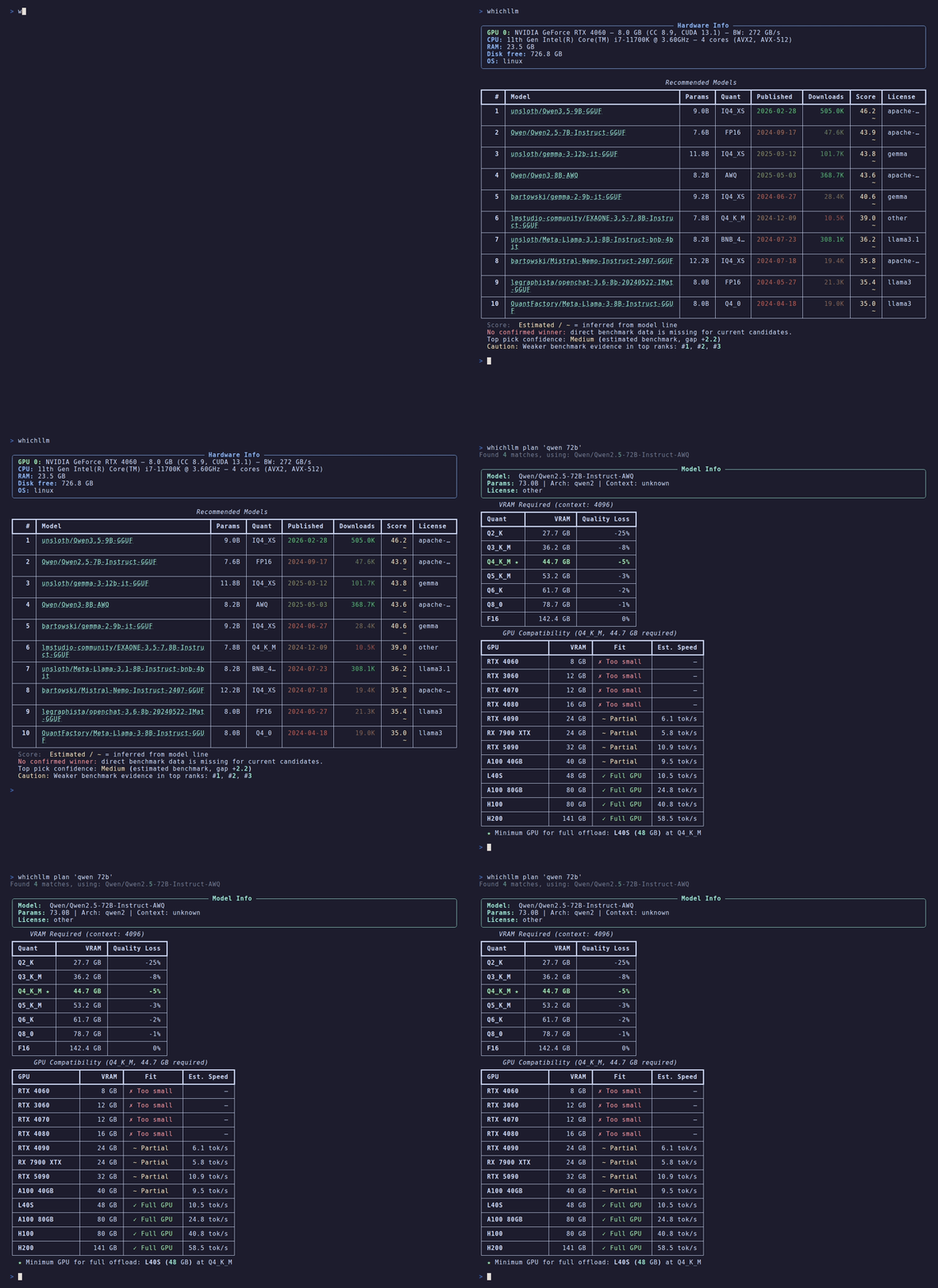
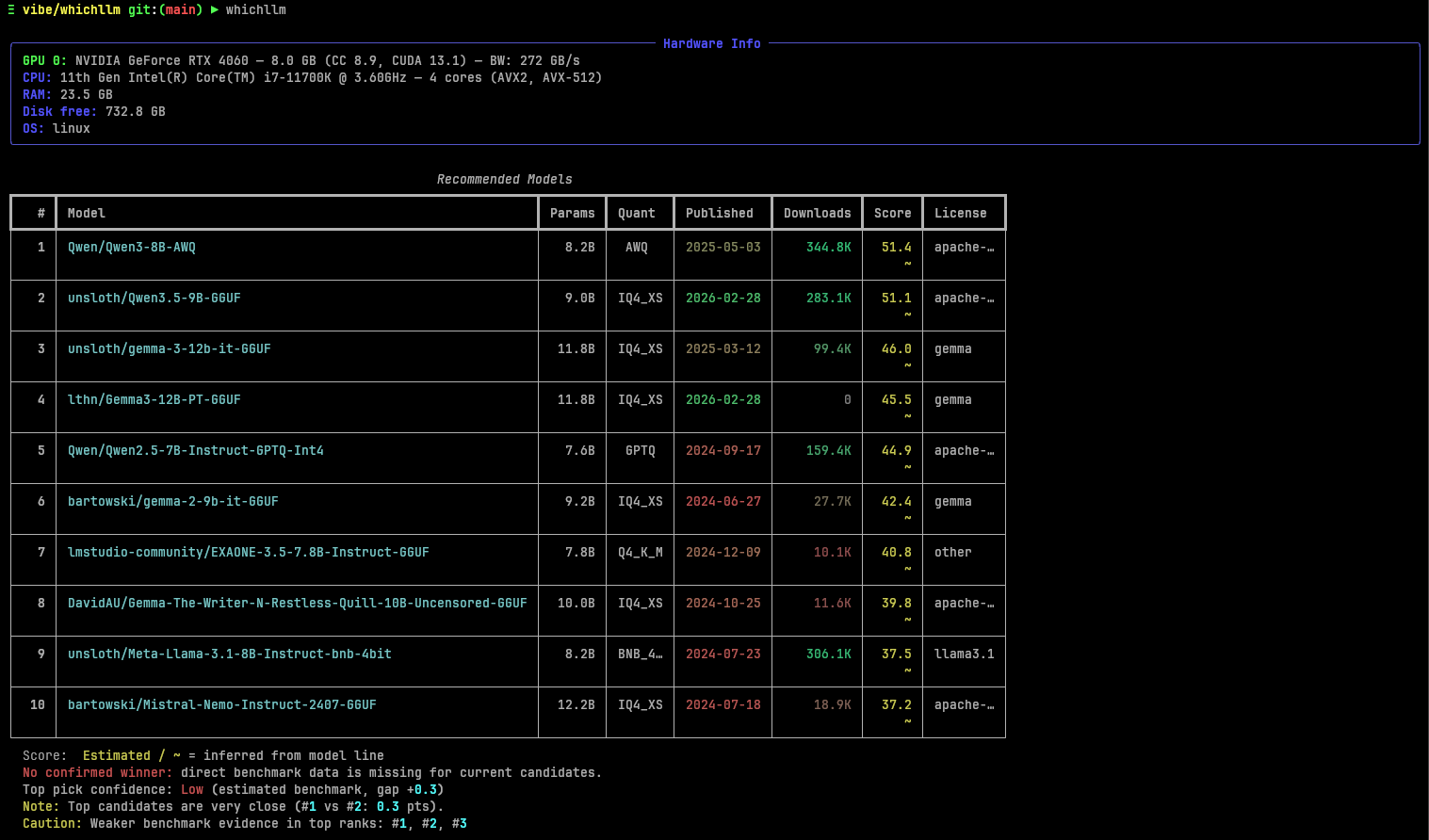
whichllm answers a deceptively difficult local-AI question: which model and quantization are likely to deliver the best useful quality on this specific computer? It detects GPU, CPU, RAM and storage, collects current Hugging Face candidates, estimates runtime fit and generation speed, then combines those constraints with benchmark evidence. The result is a ranked starting point—not a promise that the first model will be best for every prompt.
What whichllm does differently
A basic model picker asks how many parameters fit in VRAM. whichllm treats that as only one constraint. Its documentation describes a pipeline that fetches popular, recently modified and curated models from Hugging Face; groups related repositories into model families; evaluates available quantizations; estimates weights, KV cache, activations and framework overhead; checks full-GPU, partial-offload or CPU fit; and then ranks the candidates using normalized benchmark evidence.
This matters because the largest runnable file is not automatically the best choice. A newer 27B model can outperform an older 32B model, a mixture-of-experts model can generate faster than its total parameter count suggests, and a model that technically fits may leave too little headroom for a desktop, context cache or runtime. whichllm exposes controls for these tradeoffs instead of hiding them behind one “recommended” badge.
Quick start and the safer first command
uvx whichllm@latest

# Conservative first pass: full GPU fit, usable speed, 1 GB headroom
uvx whichllm@latest --gpu-only --speed usable --vram-headroom 1GB

# Simulate hardware before buying it
uvx whichllm@latest --gpu "RTX 4090"

# Compare upgrade candidates
uvx whichllm@latest upgrade "RTX 4090" "RTX 5090" "H100"
The default ranking is intentionally ambitious: it may include near-edge VRAM fits and partial RAM offload. The project's safer-pick command is a better initial filter for users who value predictable responsiveness. If another runtime still reports insufficient memory, raise the headroom, shorten the requested context, choose a smaller quantization, or inspect background VRAM use instead of assuming the estimator is wrong.
How the recommendation pipeline works
| Stage | What whichllm evaluates | Why it changes the answer |
|---|---|---|
| Hardware detection | NVIDIA, AMD, Intel, Apple Silicon, CPU features, RAM and free disk | Backend, unified memory and bandwidth differ even at similar advertised memory sizes |
| Model discovery | Popular and recent text-generation/GGUF repositories, curated frontier IDs, and vision candidates when requested | A static list becomes stale quickly and may miss usable conversions |
| Family grouping | Base-model metadata and normalized repository names | Prevents many repacks of one family from crowding the result table |
| Memory estimate | Weights, KV cache, activation memory and framework overhead | A file that fits on disk or nearly matches VRAM can still fail at runtime |
| Speed estimate | Memory bandwidth, quantization, backend, fit type and active MoE parameters | “Runnable” can mean unusably slow when layers spill to system RAM |
| Evidence ranking | Benchmark score, freshness, match quality, quantization, fit, source trust and popularity | Separates direct evidence from inherited or uploader-reported claims |
Reading the evidence labels
whichllm merges current sources such as LiveBench, Artificial Analysis and Aider with older frozen sources such as Open LLM Leaderboard v2 and Chatbot Arena coverage. Scores are normalized and older evidence is demoted by model lineage so a stale score should not silently beat a newer generation. This is useful, but merged benchmarks still represent somebody else's task mix.
| Evidence | Meaning | How to use it |
|---|---|---|
| direct | Exact independent model match | Best available ranking evidence, but still validate your workload |
| variant | Suffix-stripped or instruction variant match | Reasonable proxy; behavior may differ after tuning or quantization |
| base_model | Evidence inherited through model-card base metadata | Treat as directional, especially for strongly fine-tuned forks |
| line_interp | Size-aware interpolation within a model family | Useful for discovery, weak for close purchasing or deployment decisions |
| self_reported | Uploader-provided evaluation | Heavily discounted; seek independent reproduction |
| none | No usable benchmark match | Do not read the numeric rank as measured task quality |
The project also rejects some suspicious inheritance when a candidate's parameter count diverges too far from its family reference. That reduces errors such as a small draft head borrowing the benchmark of a much larger base, but no automated naming and metadata pipeline can identify every unusual fork.
Fit, context and quantization are coupled
Model weights are only the beginning of memory use. Longer context increases KV-cache demand; concurrent requests multiply runtime state; vision inputs and large batches add pressure; desktop display workloads consume VRAM; and framework allocation can fragment memory. A recommendation produced for a 4K context is not evidence that the same quantization will serve 64K context or multiple users.
Quantization introduces a second tradeoff. Fewer bits usually reduce weight memory and may increase throughput, but quality loss is not uniform across architectures, tasks or quantizers. whichllm applies a quantization penalty as part of ranking, yet users should compare at least two adjacent variants—often a conservative medium quantization and a smaller fallback—on exactly the prompts they intend to run.
A practical local-model selection workflow
- Write the job first. Specify chat, coding, extraction, vision, multilingual work or math; target context; acceptable latency; and whether data must stay offline.
- Record the machine. Capture exact GPU and memory, available RAM, operating system, driver/backend, free disk and background GPU use.
- Generate a conservative shortlist. Start with
--gpu-only --speed usable --vram-headroom 1GB. Use--profile,--context-lengthand--quantto match the real workload. - Inspect confidence. Prefer direct or variant evidence when scores are close. Note snapshot dates, estimated-speed markers and partial-offload warnings.
- Run three candidates. Test the top recommendation, an adjacent model or quantization, and a smaller fast baseline. One result cannot reveal the cost-quality frontier.
- Use a private evaluation set. Include representative prompts, edge cases, refusal expectations, required languages, structured-output schemas and long-context retrieval.
- Measure after correction. Track successful answers, human correction time, tokens per second, first-token latency, peak memory, load time and energy where relevant.
- Freeze the deployment. Save the exact repository, revision, filename, quantization, runtime, context settings and prompt template. A model name alone is not reproducible.
Useful commands beyond the default ranking
| Goal | Command pattern | Decision it supports |
|---|---|---|
| Inspect current hardware | whichllm hardware | Verify detection before trusting fit estimates |
| Demand full GPU residence | whichllm --gpu-only | Avoid slow PCIe/system-RAM offload candidates |
| Set a speed floor | whichllm --speed usable or --min-speed 20 | Remove technically runnable but operationally slow options |
| Plan for one model | whichllm plan "model name" | Estimate what hardware and quantization the target needs |
| Compare machines | whichllm upgrade "GPU A" "GPU B" | See how a purchase changes the candidate frontier |
| Automate selection | whichllm --top 1 --json | Feed model IDs and fit metadata into scripts |
| Start a local chat | whichllm run | Download and test a selected format in an isolated environment |
Where whichllm can mislead
- Estimated speed is not a benchmark on your machine. Backend versions, clocks, thermal limits, prompt processing and offload configuration can move performance.
- Aggregate quality hides task failures. A high general score may not predict your language, codebase, retrieval corpus, JSON reliability or safety policy.
- Repository metadata can be incomplete. Parameter counts, base-model links, licenses and conversion quality are not uniformly documented on Hugging Face.
- Live sources can fail or change shape. The tool caches data and can fall back to curated snapshots; always read the displayed freshness and confidence.
- Downloading is a supply-chain action. Review repository ownership, files, remote code requirements, license and hashes before executing model or Python artifacts.
- One-user fit is not serving capacity. Concurrency, batching, context growth and uptime requirements demand a real load test.
Alternatives and when they are better
| Option | Best fit | Tradeoff versus whichllm |
|---|---|---|
| LM Studio | GUI-first discovery, download and desktop chat | Easier interaction; less suited to transparent, scriptable ranking pipelines |
| Ollama | Simple local model packaging, serving and application integration | Excellent runtime workflow, but model selection often remains manual |
| llama.cpp | Fine-grained GGUF runtime control and direct performance testing | More operational control; more knowledge required to shortlist models |
| Artificial Analysis | Comparing hosted/open model intelligence, speed and quality evidence | Broader benchmark analysis; does not replace machine-specific local fit estimation |
| LMArena | Human preference signals and side-by-side model discovery | Useful preference evidence; not a VRAM, quantization or local-speed planner |
| Manual benchmark matrix | High-stakes teams with a stable private workload | Most relevant evidence, but expensive to build and refresh |
Decision scorecard
For each candidate, record task pass rate, correction minutes, first-token latency, generation tokens per second, peak VRAM/RAM, load time, context used, structured-output validity, license, model provenance and evidence grade. Weight the metrics before testing. A coding team may prioritize private-repository accuracy and JSON/tool reliability, while a laptop assistant may prioritize memory headroom, battery and interactive speed.
Frequently asked questions
Does whichllm download a model when I request recommendations?
The ranking flow fetches and caches model metadata rather than downloading every candidate. The run workflow can download and launch a selected model, so review disk space, repository trust and runtime dependencies before using it.
Is the number-one result guaranteed to fit?
No estimator can guarantee every runtime configuration. Leave headroom, verify detected hardware and context, then test the exact file and backend. Use full-GPU and speed filters when predictability matters.
Can it help choose a GPU?
Yes. GPU simulation, plan and upgrade can compare candidate hardware. Treat the output as planning evidence and confirm price, power, chassis, driver and real benchmark constraints separately.
Does it support Apple Silicon and CPU-only systems?
The project documents Apple Silicon, NVIDIA, AMD, Intel and CPU detection. Apple Silicon and CPU-only ranking is restricted toward GGUF for runtime stability. Actual performance still varies by chip, memory bandwidth and backend build.
Can I use the result in automation?
Yes. JSON output includes model identity, fit, estimated memory and speed metadata. Pin versions and add validation because live model inventories and benchmark data can change the top result.
Is whichllm itself a model runner?
Its primary value is selection and planning. The run command can create an isolated environment and invoke supported runtimes, while dedicated tools such as Ollama, llama.cpp or a serving stack may be better for ongoing deployment.
Official sources
- whichllm official GitHub repository and README
- Official architecture and data-pipeline documentation
- Official scoring documentation
- Official hardware detection and simulation documentation
- Official run and code-snippet workflow
- MIT license in the official repository
- Hugging Face model catalog used for live candidate discovery
Last reviewed July 25, 2026. Model inventories, benchmark snapshots, runtime compatibility and hardware prices change; rerun the current CLI and validate the exact model artifact before deciding.