Übersicht
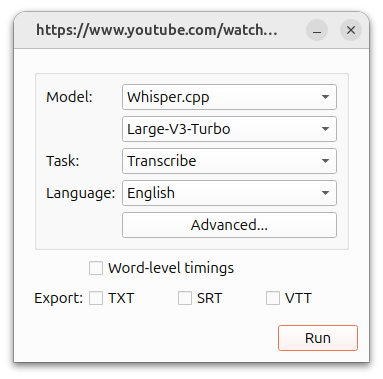
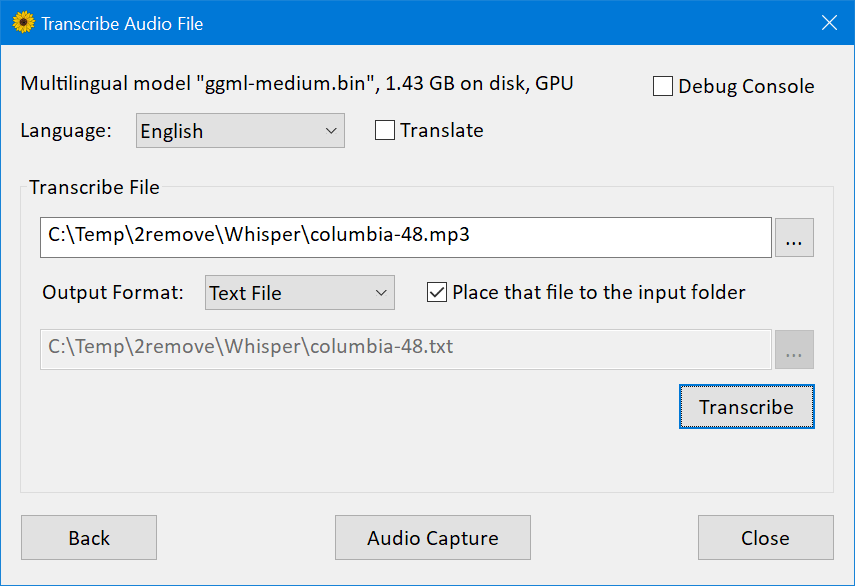
WhisperDesktop ist die Windows-Desktopanwendung von Const-me/Whisper, einer leistungsstarken GPGPU-Implementierung, die von whisper.cpp und OpenAI Whisper inspiriert ist. Die README-Datei beschreibt einen einfachen Desktop-Ablauf: Laden Sie eine Veröffentlichungs-ZIP-Datei herunter, wählen Sie ein Whisper-Modell, transkribieren Sie Audio-/Videodateien oder erfassen Sie Live-Mikrofon-Audio zur Transkription oder Übersetzung.
Beste Passform
Es eignet sich für Windows-Benutzer, die lokale Spracherkennung ohne Python-Setup wünschen, insbesondere wenn es auf die GPU-Beschleunigung durch DirectCompute ankommt. Die Suchabsicht umfasst normalerweise WhisperDesktop Windows, OpenAI Whisper GUI, lokale Transkriptions-App, GPU Whisper und Offline-Spracherkennung.
Hauptmerkmale
- Windows-Desktop-GUI zum Laden von Whisper-Modellen und zum Transkribieren von Audio-/Videodateien.
- Live-Capture-Bildschirm für Mikrofontranskription oder -übersetzung.
- Herstellerunabhängige GPGPU-Implementierung basierend auf DirectCompute und nicht nur auf CUDA-Annahmen.
- Media Foundation Audioverarbeitung für viele Audio-/Videoformate und die meisten Windows-Aufnahmegeräte.
- Open-Source-Projekt, das konzeptionell mit OpenAI Whisper und whisper.cpp verbunden ist, aber als Windows-fokussierte App implementiert wurde.
Echte Anwendungsfälle
- Transkribieren Sie Interviews, Besprechungsaufzeichnungen, Vorträge, Podcasts oder Videodateien lokal unter Windows.
- Nutzen Sie die GPU-Beschleunigung auf unterstützter Windows-Hardware, ohne Python- oder CUDA-Pipelines einzurichten.
- Erfassen Sie Mikrofon-Audio für schnelle lokale Spracherkennungstests.
- Konvertieren Sie Audio-/Videoinhalte in Text, bevor Sie sie mit einem anderen LLM zusammenfassen.
- Vergleichen Sie die GUI-Optionen von Windows Whisper, wenn Datenschutz, Offline-Nutzung oder lokale Dateien wichtig sind.
Empfohlener Arbeitsablauf
- Laden Sie die Release-ZIP-Datei von GitHub herunter und entpacken Sie sie lokal.
- Wählen Sie ein Whisper-Modell; In der README-Datei wird ggml-medium.bin als häufig getestetes Modell erwähnt, aber Benutzer können je nach Geschwindigkeits- und Genauigkeitsanforderungen eine Auswahl treffen.
- Laden Sie eine Audio-/Videodatei oder verwenden Sie die Mikrofonaufnahme und überprüfen Sie dann das Transkript manuell.
- Testen Sie bei langen Aufnahmen zunächst eine kurze Probe, um Geschwindigkeit und Genauigkeit abzuschätzen.
- Bewahren Sie vertrauliche Aufzeichnungen vor Ort auf und überprüfen Sie Transkripte, bevor Sie sie veröffentlichen oder als Beweismittel verwenden.
Stärken und Grenzen
- Nützlich für lokale Windows-Transkription und GPU-beschleunigte Experimente.
- Windows-orientiert; Benutzer von macOS/Linux bevorzugen möglicherweise whisper.cpp-, EasyWhisperUI-, MacWhisper- oder Befehlszeilen-Whisper-Setups.
- Die Genauigkeit hängt von der Modellgröße, der Sprache, der Audioqualität, der Lautsprecherüberlappung, den Akzenten und den Hintergrundgeräuschen ab.
- Die Schnittstelle ist praktisch, aber keine verwaltete Team-Transkriptionsplattform mit Sprecher-Tagebuchführung, Zusammenarbeit oder Compliance-Kontrollen.
Alternativen
- OpenAI Whisper für die Verwendung von Python-basierten Modellen.
- whisper.cpp für plattformübergreifende Befehlszeilen-/lokale Bereitstellungen.
- MacWhisper für macOS-Benutzer.
- EasyWhisperUI für plattformübergreifende GUI Whisper-Workflows.
- Otter, Descript oder Fireflies für Cloud-Transkription, Zusammenarbeit und Besprechungsworkflows.
Medien und Beispiele
FAQ
Was ist WhisperDesktop?
WhisperDesktop ist eine Windows-GUI-Anwendung zum lokalen Ausführen der Spracherkennung im OpenAI Whisper-Stil mit Dateitranskriptions- und Mikrofonerfassungs-Workflows.
Funktioniert WhisperDesktop offline?
Ja, nach dem Herunterladen der Anwendungs- und Modelldateien ist es für die lokale Transkription konzipiert. Benutzer sollten dennoch die Modell-, Hardware- und Formatunterstützung auf ihrem Computer überprüfen.
Ist WhisperDesktop besser als Cloud-Transkription?
Es ist besser, wenn lokale Verarbeitung, Datenschutz oder Windows-GPU-Beschleunigung wichtig sind. Cloud-Tools eignen sich möglicherweise besser für die Zusammenarbeit, die Tagebuchführung, Besprechungsnotizen und die Teamverwaltung.
Quellen überprüft
- WhisperDesktop GitHub-Repository
- WhisperDesktop README
- OpenAI Whisper-Repository
- whisper.cpp-Repository
WhisperDesktop, Whisper.cpp und OpenAI Whisper sind nicht dasselbe Paket
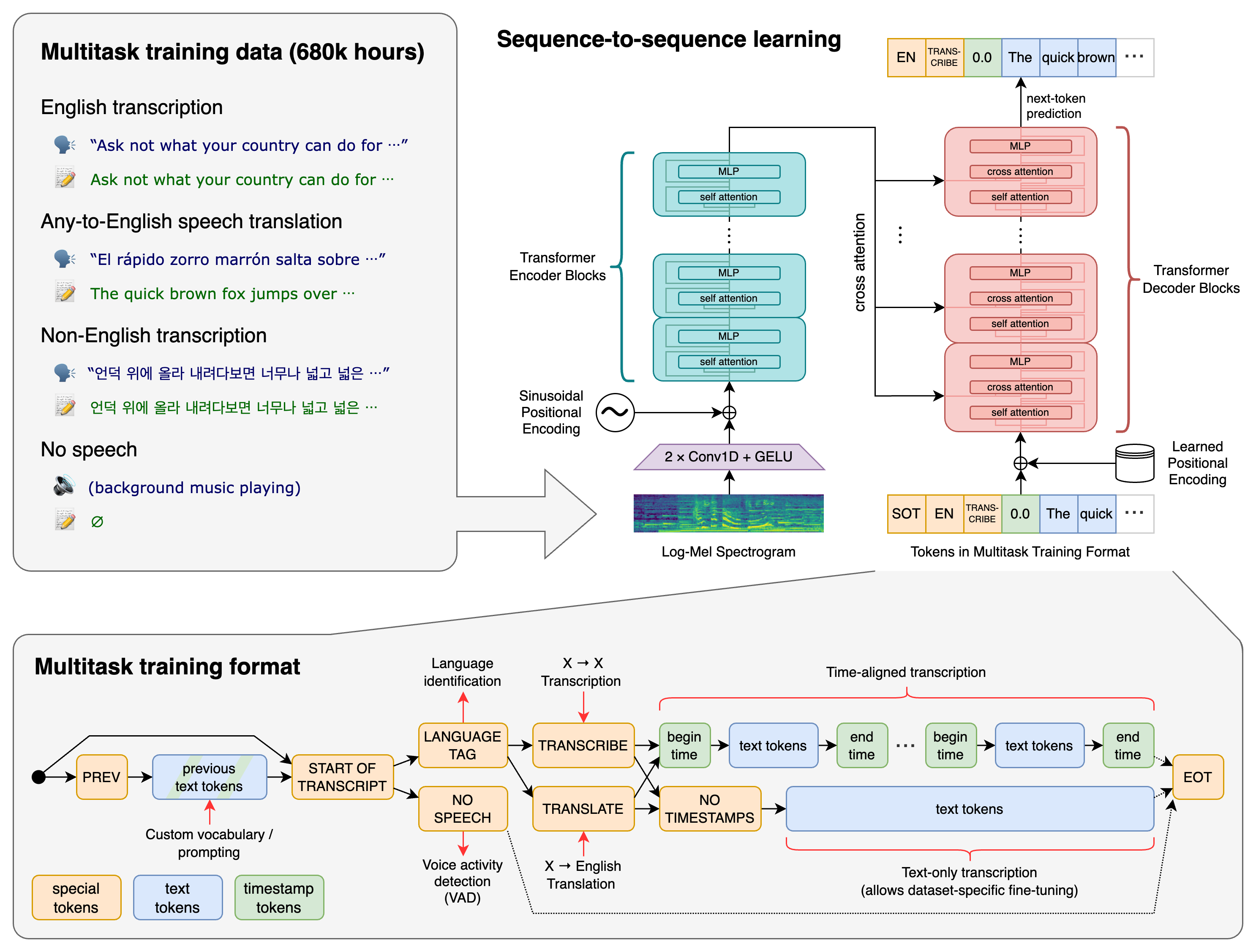
WhisperDesktop gehört zum Const-me/Whisper-Repository, einer Windows-orientierten Implementierung mit einer nativen Desktop-Oberfläche und DirectCompute-Beschleunigung. Es verwendet Modelle aus der Whisper-Familie, ist jedoch nicht das ursprüngliche Python-Repository von OpenAI und nicht die whisper.cpp-Laufzeit von ggml-org. Installationsanweisungen, Modellformate, unterstützte Backends, Befehlszeilenverhalten, Releases und Wartung müssen daher im Const-me-Projekt selbst überprüft werden.
| Option | Primäre Erfahrung | Starke Passform | Hauptkompromiss |
|---|---|---|---|
| WhisperDesktop | Native Windows-GUI und DirectCompute-Implementierung | Windows-Benutzer, die lokale Datei- oder Mikrofontranskription ohne Python wünschen | Windows-spezifisches Projekt und kleineres Anwendungsökosystem |
| whisper.cpp | Beispiele für portable C/C++-Laufzeit, CLI, Server, Streaming und Einbettung | Plattformübergreifende Anwendungen, Geräte, Automatisierung und benutzerdefinierte Schnittstellen | Mehr Einrichtungs- oder Integrationsaufwand für einen technisch nicht versierten Desktop-Benutzer |
| OpenAI Whisper | Referenz PyTorch Implementierung | Recherche, Python-Workflows und Kompatibilitätsbasis | Längere Laufzeit und weniger Verpackung für Desktop-Produkte |
| Verwalteter Transkriptionsdienst | Upload/API plus gehostete Verarbeitungs- und Kollaborationsfunktionen | Teams, die Tagebuchführung, Verwaltung, elastische Skalierung oder Unterstützung benötigen | Wiederkehrende Kosten, Datenübertragung, Aufbewahrung und Anbieterabhängigkeit |
Checkliste für Windows-Setup und Kompatibilität
- Von der offiziellen GitHub-Version herunterladen. Überprüfen Sie den Repository-Eigentümer, die Versionshinweise, den Archivnamen und Hashes oder Signaturen, sofern bereitgestellt.
- In einen vom Benutzer beschreibbaren Ordner extrahieren. Vermeiden Sie das Mischen von Dateien aus mehreren Versionen. Bewahren Sie die heruntergeladene ZIP-Datei auf, bis die Installation überprüft wurde.
- Besorgen Sie sich ein kompatibles Modell. Befolgen Sie die aktuellen Modellanweisungen des Projekts, anstatt davon auszugehen, dass jedes Whisper- oder whisper.cpp-Dateiformat austauschbar ist.
- Testen Sie den Grafikpfad. Aktualisieren Sie vertrauenswürdige GPU-Treiber, bestätigen Sie die Kompatibilität mit DirectCompute und vergleichen Sie das CPU-/GPU-Verhalten mit einer kurzen bekannten Aufzeichnung.
- Testen Sie die Mediendekodierung. WhisperDesktop verwendet Windows Media Foundation; Die Codec-Unterstützung kann je nach Windows-Version, installierten Komponenten und Quelldateien unterschiedlich sein.
- Bewahren Sie eine zweifelsfrei funktionierende Verpackung auf. Behalten Sie vor dem Upgrade die Anwendungsversion, die Modelldatei, die Einstellungen und eine Beispieleingabe/-ausgabe bei.
So wählen Sie ein Whisper-Modell aus
Ein größeres Modell kann die Erkennung verbessern, verbraucht jedoch mehr Speicher, Arbeitsspeicher und Rechenleistung. Ein kleineres Modell ist möglicherweise die bessere Desktop-Wahl, wenn die Ergebnisse schnell genug für eine interaktive Überprüfung vorliegen. Nur englischsprachige Varianten können für Englisch effizient sein, während die mehrsprachige Erkennung und die Sprach-in-Englisch-Übersetzung ein geeignetes mehrsprachiges Modell erfordern. Das Beispielmodell der README-Datei ist keine allgemeingültige Empfehlung.
| Arbeitsbelastung | Beginnen Sie mit dem Testen | Akzeptanzkriterien | Betriebskontrolle |
|---|---|---|---|
| Klares englisches Interview | Kleines oder mittelgroßes englischsprachiges Modell | Namen, Zahlen, Satzzeichen und geringe Korrekturzeit | Verarbeitungsgeschwindigkeit und Speicher auf dem PC des Benutzers |
| Mehrsprachige Aufnahme | Mehrsprachige kleine/mittlere/große Optionen | Korrekte Sprache, Code-Umschaltung, Entitäten und kein übersetzter Text, sofern nicht angefordert | Modell-Downloadgröße und anhaltende Thermik |
| Lautes Treffen | Größeres Modell plus Vergleich der Audiobereinigung | Der Lautsprecherinhalt bleibt trotz Raumgeräuschen und Entfernung erhalten | Ob eine Diarisierung außerhalb von WhisperDesktop erforderlich ist |
| Live-Mikrofon | Modell, das angenehm schneller als in Echtzeit bleibt | Stabiler Teil-/Endtext und akzeptable End-to-End-Verzögerung | Erfassen Sie Gerät, Beispielformat, Pufferung und konkurrierende GPU-Last |
| Langes Videoarchiv | Kurze repräsentative Muster vor der Batch-Arbeit | Genauigkeit über Lautsprecher und Aufnahmezeiträume hinweg | Festplatte, Fehlerwiederherstellung, Warteschlangen und Ausgabeorganisation |
Transkription und Übersetzung sind unterschiedlich
Die Transkription schreibt Sprache in ihrer gesprochenen Sprache. Die Übersetzungsaufgabe von Whisper wandelt unterstützte Sprache in Englisch um. Es ist kein allgemeiner Textübersetzer und übersetzt nicht aus einer beliebigen Ausgangssprache in eine beliebige Zielsprache. Beschriften Sie die ausgewählte Aufgabe in exportierten Dateien, damit ein übersetztes englisches Transkript nicht mit einem wörtlichen Datensatz in der Originalsprache verwechselt wird.
Überprüfen Sie für Untertitel das Timing der Segmente, die Zeilenlänge, die Lesegeschwindigkeit, die Zeichensetzung und die Schnitte in einem Videoeditor. Whisper-Zeitstempel sind maschinelle Schätzungen. Namen, Zitate, rechtliche oder medizinische Aussagen, Mengen und zeitkritische Anweisungen müssen anhand der Audioquelle überprüft werden.
Datenschutz: Lokal hilft, aber überprüfen Sie den gesamten Desktop-Workflow
Nachdem das Programm und das Modell heruntergeladen wurden, kann die Transkription auf dem Windows-Computer verbleiben. Dadurch entfällt die Notwendigkeit, Audiodaten in eine gehostete Sprachausgabe API hochzuladen, der Datenschutz hängt jedoch weiterhin vom Betriebssystem, dem Benutzerkonto, den Sicherungsordnern, den mit der Cloud synchronisierten Verzeichnissen, dem Antivirenprogramm, der Absturzberichterstattung, der Zwischenablage, den temporären Medien, dem exportierten Text und allen nachgelagerten Zusammenfassungen ab.
- Speichern Sie vertrauliche Aufzeichnungen und Transkripte an zugriffskontrollierten, verschlüsselten Orten.
- Bestätigen Sie die Einwilligung zur Aufnahme und den rechtlichen Zweck, bevor Sie Mikrofone, Besprechungen, Anrufe oder andere Personen aufzeichnen.
- Löschen Sie temporäre Dateien und Exporte gemäß einer Aufbewahrungsrichtlinie. Das Leeren des Anwendungsfensters ist kein Löschen.
- Bewahren Sie die Audioquelle auf, wenn ein Transkript möglicherweise angefochten wird, und notieren Sie, ob es von einem Menschen überprüft wurde.
- Wenn Text später an einen Online-LLM gesendet wird, lesen Sie die Datenbedingungen dieses separaten Anbieters und entfernen Sie unnötige personenbezogene Daten.
Desktop-Workflow zur Qualitätskontrolle
- Wählen Sie fünf bis zehn repräsentative Aufnahmen aus, einschließlich der schlechtesten Mikrofon-, Geräusch-, Akzent- und Sprachbedingungen.
- Erstellen Sie von Menschen überprüfte Referenzpassagen mit Namen, Nummern, Fachbegriffen und Zeitstempeln.
- Führen Sie Kandidatenmodelle mit derselben Aufgabe und denselben Einstellungen aus. Zeichnen Sie Anwendungsversion, Modelldatei, Hardware und verstrichene Zeit auf.
- Zählen Sie Ersetzungen, Löschungen, Einfügungen, Entitätsfehler, Zeitfehler, Abstürze und manuelle Korrekturminuten.
- Wiederholen Sie einen Test mit langen Dateien, um durch kurze Clips verborgene Speicher-, Wärme-, Dekodierungs- und Stabilitätsprobleme aufzudecken.
- Wählen Sie das kleinste Modell, das die Qualitäts- und Zeitanforderungen erfüllt, mit Spielraum für den langsamsten unterstützten PC.
| Metrisch | Definition | Warum es wichtig ist |
|---|---|---|
| Wortfehlerrate | Ersetzungen + Löschungen + Einfügungen geteilt durch Referenzwörter | Standarderkennungsvergleich, kann jedoch kritische Entitätsfehler verbergen |
| Entitätsgenauigkeit | Korrigieren Sie Namen, Nummern, Daten, Produkte und Terminologie | Bestimmt oft, ob ein Transkript operativ nützlich ist |
| Echtzeitfaktor | Verarbeitungssekunden geteilt durch Audiosekunden | Zeigt an, ob eine Datei schneller verarbeitet wird als die Wiedergabe |
| Korrekturprotokoll | Zeitaufwand von der Rohausgabe bis zum genehmigten Transkript | Misst die tatsächliche Produktivität |
| Langzeitstabilität | Abschluss, Absturz, Speicher und thermisches Verhalten auf langen Medien | Verhindert die Auswahl eines Modells aus einem irreführenden Kurztest |
Wenn WhisperDesktop nicht die beste Wahl ist
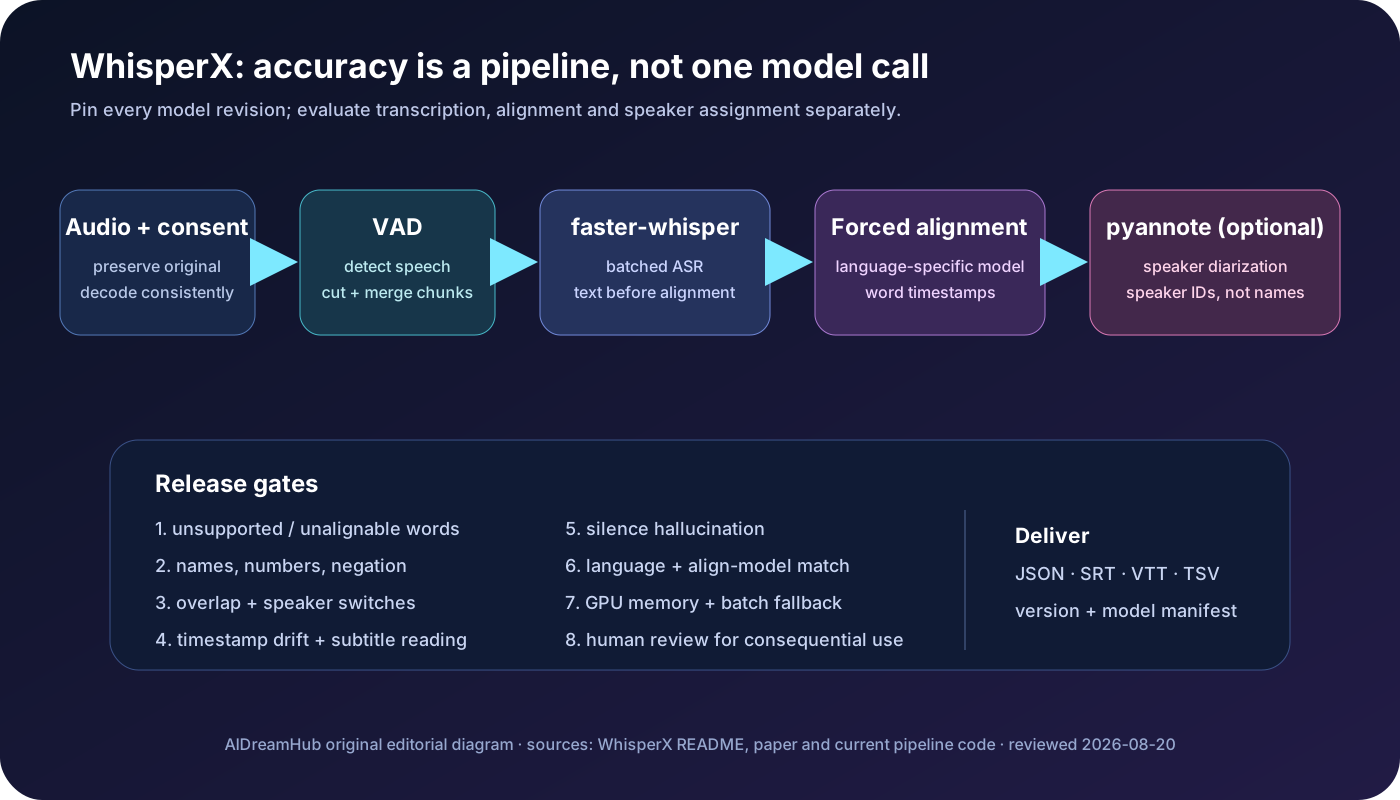
Wählen Sie einen anderen Weg, wenn Benutzer macOS oder Linux, automatisierte Serverwarteschlangen, programmatische Integration, gemeinsame Arbeitsbereiche, Sprecherkennzeichnung, Meeting-Bots, zentralisierte Aufbewahrung, Administratorkontrollen oder garantierten Support benötigen. Für ein verteiltes Team ist ein verwalteter Dienst möglicherweise besser geeignet. whisper.cpp oder faster-whisper sind möglicherweise besser für eine benutzerdefinierte Anwendung oder einen Batch-Dienst geeignet.
Häufig gestellte Fragen
Ist WhisperDesktop eine offizielle OpenAI-Anwendung?
Nein. Es handelt sich um eine unabhängige Windows-Implementierung im Const-me/Whisper-Repository, die von der OpenAI Whisper-Familie abgeleitete Modelle ausführt.
Benötigt WhisperDesktop CUDA?
Das Projekt ist auf DirectCompute ausgelegt und erfordert nicht NVIDIA CUDA, aber die tatsächliche GPU-Kompatibilität und Leistung hängen von Windows, Treibern, Hardware und der aktuellen Version ab.
Kann WhisperDesktop Videodateien transkribieren?
Ja, es verwendet Windows Media Foundation, um unterstützte Audio- und Videoformate zu lesen. Testen Sie den genauen Codec und die Windows-Edition, da die Medienunterstützung nicht auf jedem Computer identisch ist.
Identifiziert es Sprecher?
Es handelt sich nicht um eine vollständig verwaltete Diarisierungsplattform. Wenn zuverlässige Sprecherkennzeichnungen erforderlich sind, fügen Sie einen dedizierten Diarisierungs-Workflow hinzu und validieren Sie ihn.
Kann es offline funktionieren?
Ja, sobald die kompatiblen Programm- und Modelldateien installiert sind. Überprüfen Sie, ob Quell- oder Ausgabeordner von einem anderen Windows- oder Cloud-Dienst synchronisiert werden.
Sollte ich dem Transkript vertrauen, ohne zuzuhören?
Nein. Überprüfen Sie Namen, Nummern, Zitate, Domänenterminologie, sensible Behauptungen und unsichere Passagen anhand der Quellenaufzeichnung.
Offizielle und unterstützende Quellen
- Const-me/Whisper-Repository und WhisperDesktop-Versionen
- WhisperDesktop offizielle README-Datei und Einrichtungsanleitung
- WhisperDesktop Veröffentlichungsverlauf
- OpenAI Whisper Referenz-Repository
- whisper.cpp-Repository für plattformübergreifenden Vergleich
- Microsoft Media Foundation-Dokumentation
Zuletzt überprüft am 25. Juli 2026. Versionen, Modellkompatibilität, Windows-Anforderungen, DirectCompute-Verhalten und Mediencodecs können sich ändern; Überprüfen Sie das offizielle Repository auf dem genauen Ziel-PC.